
Spotify announced Tuesday that it hit 751 million total monthly active users (MAUs) for quarter-four of 2025. That record-high is an 11 percent jump from the year before and a significant bump from the third quarter's 713 million MAUs.
The quarterly earnings report also showed a 10 percent jump year-over-year in Premium subscribers, from 263 million to 290 million. Europe makes up the greatest number of the Swedish company's premium subscribers (36 percent), with North America coming second at 25 percent.
Spotify contributes a few factors to its growth, including AI. "We consider ourselves the R&D department for the music industry. Our job is to understand new technologies quickly and capture their potential, which we've done time and again," Gustav Söderström, Co-CEO of Spotify, said in a statement. The entire industry stands to benefit from this [AI] paradigm shift but we believe those who embrace this change and move fast, will benefit the most." In late 2025, Spotify announced it would get rid of some of the AI "slop" on its platform and have "artist-first AI music products" — though the specifics were very vague.
The company also claims that December's Spotify Wrapped was bigger than ever, with over 300 million engaged users and 630 million shares across 56 languages.
This article originally appeared on Engadget at https://www.engadget.com/entertainment/music/spotify-now-has-more-than-750-million-monthly-users-124103630.html?src=rssThe House Judiciary Committee wants the US Department of Justice to turn over all its communications with both Apple and Google regarding the companies' decisions to remove apps that shared information about sightings of US Immigration and Customs Enforcement officers.
Several apps were removed from both Apple's App Store and Google's Play Store in October. Politico reported that Raskin has contacted Attorney General Pam Bondi.
"The coercion and censorship campaign, which ultimately targets the users of ICE-monitoring applications, is a clear effort to silence this Administration's critics and suppress any evidence that would expose the Administration's lies, including its Orwellian attempts to cover up the murders of Renee and Alex," Raskin wrote to Bondi.
— Mat Smith
The biggest stories you might have missed
How to disable Ring's creepy Search Party featureSay goodbye to AI-assisted mass surveillance… for now.
 RINGRing
Ring's Super Bowl ad showcased its Search Party feature, scaring the pants off anyone concerned about a mass surveillance state and, well, the state of everything at the moment. Search Party turns individual Ring devices into a surveillance network. Each camera uses AI to detect pets running within its field of view, and feeds are pooled to help identify lost animals. If it can handle pups, why not people? Here's how to disable it.
Inside the Ive-designed interior of Ferrari's luxe EVThe Luxurious Luce.
 FerrariFerrari
On a lighter note, consumer tech! Ferrari's new car is no Apple Car. This is the Ferrari Luce ("light" in Italian), the actual name for the EV formerly known as Elettrica, and we (well, Tim Stevens) were lucky enough to get a walkthrough with Sir Jony Ive himself.
That's because the interior was designed by LoveFrom, founded by Ive after leaving Apple in 2019. OpenAI acquired the design firm for $6.5 billion, and while the company has had numerous projects, the Luce could be its biggest yet. It's filled with playful touches and a lot of, well, glass. If that tilting screen doesn't shout iPhone design, what does?
This article originally appeared on Engadget at https://www.engadget.com/general/the-morning-after-doj-may-face-investigation-over-removal-of-ice-agent-tracking-apps-121500737.html?src=rssWaymo has gotten a step closer to offering robotaxi rides to the public in Nashville, Tennessee. The company the city and making sure they can operate as fully autonomous rides before launching a paid service in the location. Waymo announced that it was planning to bring its robotaxis to Nashville in September 2025, with the intention opening up rides to the public sometime this year. The company has been testing its technology in Nashville since then, but it has yet say when it'll start accepting bookings for rides.
The company conducts extensive testing in every new city before deploying its robotaxi service. It starts by having safety drivers map the area and then updating its software with information learned from those tests, since each city has its own driving rules and conditions. Despite its testing, Waymo has had to issue a software recall several times in the past after its vehicles malfunctioned when faced with real hazards on the road. Its vehicles were previously seeing hitting gates, chains, telephone poles and stationary vehicles. Most recently, it issued a recall because its robotaxis failed to stop for school buses.
At the moment, Waymo vehicles are already open to the public in Los Angeles, San Francisco, Miami and Phoenix, as well as in Atlanta and Austin through a partnership with Uber. It's active in a lot more locations, including New York, New Orleans, Seattle and even Tokyo, Japan, but it's not serving riders in those locations yet. Nashville is in the list of new locations where Waymo is conducting or planning to conduct driverless trials, along with Boston, Dallas, Denver, Detroit, Houston, Las Vegas, Orlando, Sacramento, San Antonio, San Diego, Washington and London, UK.
This article originally appeared on Engadget at https://www.engadget.com/transportation/waymos-vehicles-are-now-fully-driverless-in-nashville-120412343.html?src=rssVR headsets are impressive gadgets on their own, but the right accessories can significantly improve comfort, usability and immersion. From controller grips that offer better handling to upgraded head straps that balance weight and extend battery life, these add-ons can make long sessions more enjoyable and less fatiguing. Some accessories focus on convenience, like charging docks and storage stands, while others enhance how virtual experiences feel through haptic feedback or more secure fits.
As VR continues to expand beyond gaming into fitness, productivity and mixed reality experiences, accessories are starting to serve a wider range of functions. Whether you're looking to fine-tune comfort, improve tracking or add realism to your virtual world, these are the VR accessories worth considering in 2026.
Best VR accessories: Headsets
Best VR accessories: Fitness
Best VR accessories: Cables, chargers and batteries
VR accessories FAQs What equipment do you need for VR?
What you need depends on the VR headset you buy. Some devices, like the Meta Quest 3, are entirely standalone, which means you don't need anything but the headset itself to use it. Other VR headsets need to be connected to a system from which it can draw power and run software. Some systems, like the HP Reverb G2, must connect to a PC, while others like the PS VR2 can connect to gaming consoles like the PS5. Most VR headsets come with the basic controllers you'll need to control actions and movement in virtual worlds.
What's the difference between PC VR, Smartphone VR and Gaming Console VR?The main difference between those three VR systems is the main machine that allows the VR headset to run. PC VR headsets require a PC, like a gaming laptop or desktop, to run, while smartphone and gaming console VR systems require smartphones and gaming consoles, respectively, to work.
Do all VR headsets need a phone?No, not all VR headsets need a phone to work. Many VR headsets have build in displays that sit in front of your eyes and basically act as your window into the virtual world.
This article originally appeared on Engadget at https://www.engadget.com/ar-vr/best-vr-accessories-150021126.html?src=rssI'm a longtime lover of pen and paper, so E Ink tablets have been intriguing to me ever since they started becoming more widely available. After having hundreds of half-filled notebooks over the years, I, at some point, turned to digital tools instead because it was just easier to store everything on my phone or laptop so I always had my most important information at my fingertips.
E-Ink tablets seem to provide the best of both worlds: the tactile satisfaction of regular notebooks with many of the conveniences found in digital tools, plus easy-on-the-eyes E-Ink screens. These devices have come a long way in recent years — now you can find them in multiple sizes, some have color E Ink screens and others double as full-blow ereaders with access to ebook stores and your local library's offerings. I've tested out close to a dozen E Ink tablets over the past few years to see how well they work, how convenient they really are and which are the best tablets using E Ink screens available today.
Are E Ink tablets worth it?
An E Ink tablet will be a worthwhile purchase to a very select group of people. If you prefer the look and feel of an e paper display to LCD panels found on traditional tablets, it makes a lot of sense. They're also good options for those who want a more paper-like writing experience (although you can get that kind of functionality on a regular tablet with the right screen protector) or a more distraction-free device overall.
The final note is key here. Many E Ink tablets don't run on the same operating systems as regular tablets, so you're automatically going to be limited in what you can do. And even with those that do allow you to download traditional apps like Chrome, Instagram and Facebook, E Ink tablets are not designed to give you the best casual-browsing experience. This is mostly due to the nature of E Ink displays, which have noticeable refreshes, a lack of vibrant colors and lower picture quality than the panels you'll find on even the cheapest iPad.
Arguably the biggest reason why you wouldn't want to go with an iPad (all models of which support stylus input, a plethora of reading apps, etc) is because it's much easier to get distracted by email, social media and other Internet-related temptations.
What to look for in an E Ink tablet Writing and latencyArguably the most important thing to consider when looking for an E Ink tablet is the writing experience. How good it is will depend a lot on the display's refresh rate (does it refresh after every time you put pen to "paper," or at a different regular interval) and the stylus' latency. Most of the tablets I've tested have little to no latency, but some are certainly better than others. Finally, you should double check before buying that your preferred E Ink tablet comes with a stylus, or if you need to purchase one separately.
ReadingHow much will you be reading books, documents and other things on this tablet? E Ink tablets come in many sizes, but most of them tend to be larger than your standard e-reader because it makes writing much easier. Having a larger display isn't a bad thing, but it might make holding it for long periods slightly more uncomfortable. (Most e-readers are roughly the size of a paperback book, giving you a similar feeling to analog reading).
The supported file types for e-books can also make a big difference. It's hard to make a blanket statement here because this varies so much among E Ink tablets. The TL;DR is that you'll have a much better reading experience if you go with one made by a company that already has a history in e-book sales (i.e. Amazon or Kobo). All of the titles you bought via the Kindle or Kobo store should automatically be available to you on your Kindle or Kobo E Ink tablet.
Also with Kindle titles, specifically, since they are protected by DRM, it's not necessarily the best idea to try to bring those titles over to a third-party device. Unless the tablet runs an operating system like Android that supports downloads for apps like Kindle and Kobo, you'll be limited to supported file types, like ePUB, PDF, MOBI, JPEG, PNG and others.
Search functionalityMost E Ink tablets have some on-device search features, but they can vary widely between models. You'll want to consider how important it is to you to be able to search through all your handwritten notes and markups. I noticed in my testing that Amazon's and Kobo's E Ink tablets made it easy to refer back to notes made in books and files because they automatically save to the specific pages on which you took notes, made highlights and more.
Searching is less standardized on E Ink tablets that have different supported file types, but their features can be quite powerful in their own right. For example, a few devices I tested supported text search in handwritten notes along with handwriting recognition, the latter of which allows you to translate your scribbles into typed text.
Sharing and connectivityWhile we established that E Ink tablets can be great distraction-free devices, most manufacturers understand that your notes and doodles aren't created in a vacuum. You may want to access them elsewhere, and that requires some form of connectivity. All of the E Ink tablets I tried have Wi-Fi support, and some support cloud syncing, companion mobile apps and the ability to export notes via email so you can access them elsewhere.
None of them, however, integrate directly with a digital note taking system like Evernote or OneNote, so these devices will always be somewhat supplementary if you use apps like that, too. I'd argue that, if you already lean heavily on apps like OneNote, a standard tablet with a stylus and screen protector might be the best way to go. Ultimately, you should think about what you will want to do with the documents you'll interact with on your E Ink tablet after the tablet portion is done.
PriceE Ink tablets aren't known for being cheap. They generally fall into the $300-$800 price range, which is what you can expect to pay for a solid regular tablet, too. A key factor in price is size: cheaper devices with E Ink displays are likely to have smaller screens, and stylus support isn't as much of a given. Also, those types of devices are generally considered e-readers because of their size and may not be the best for note-taking, doodling and the like.
E Ink tablets have gone up in price recently. Supernote and Onyx Boox increased prices, as did reMarkable. The former said it was due to "increased costs," and a reMarkable representative confirmed this to Engadget and provided the following statement: "We regularly review our pricing based on market conditions and operational costs. We've communicated an upcoming adjustment for the US market effective in May to provide transparency to our customers. Multiple factors influence our pricing decisions, including supply chain dynamics and overall operational costs in specific markets."
As a result, the reMarkable Paper Pro jumped from $579 to $629 (that's for the bundle with the standard Marker and no Folio). This isn't great, considering the Paper Pro was already on the expensive side of the spectrum for E Ink tablets. It's also worth noting that Supernote and Onyx Boox have raised prices in the past few months as well.
Other E Ink tablets we've tested Onyx Boox Tab X CThe Boox Tab X C is a color-screened version of the Tab X, the company's all-purpose e-paper Android tablet. The Tab X C has a lovely 13.3-inch Kaleido 3 E Ink color display, an octa-core processor, 6GB of RAM and it runs on Android 13, making it one of the most powerful tablets in Boox's lineup. I've used the Tab X in the past and this color version runs similarly, if not better, and at 5.3mm thick, it's impressively svelte even when you pair it with its folio keyboard case. As someone who loves legal-pad sized things to write on, I also like how the Tab X C is most akin to A4-size paper. But at $820 for the bundle with the standard case (or a whopping $970 for the tablet and its keyboard case), it's really only best for those who are ready to go all-in on a premium E Ink tablet.
Lenovo Smart PaperLenovo made a solid E Ink tablet in the Smart Paper, but it's too pricey and too married to the company's companion cloud service to warrant a spot on our top picks list. The hardware is great, but the software isn't as flexible as those of competitors like the reMarkable 2. It has good Google Drive integration, but you must pair it with Lenovo's cloud service to really get the most use out of it — and in the UK, the service costs £9 per month for three months, which is quite expensive.
Onyx Boox Tab UltraThe Boox Tab Ultra has a lot of the same features we like in the Note Air 2 Plus, but it's designed to be a true, all-purpose tablet with an E Ink screen. Running Android 11 and compatible with a magnetic keyboard case, you can use it like a standard 2-in-1 laptop, albeit a low-powered one. You can browse the web, check email and even watch YouTube videos on this thing — but that doesn't mean you should. A standard 2-in-1 laptop with a more responsive screen and better overall performance would be a better fit for most people who even have the slightest desire to have an all-in-one device. Like the rest of Onyx's devices, the Tab Ultra is specifically for those who put reading and eye comfort above all else.
This article originally appeared on Engadget at https://www.engadget.com/mobile/tablets/best-e-ink-tablet-130037939.html?src=rssAnother day, another wave of gaming layoffs. Today it's Riot Games with the announcement that it's cutting jobs on its pair-based fighting game 2XKO. For context, a representative from Riot confirmed to Game Developer that about 80 people are being cut, or roughly half of 2XKO's global development team.
"As we expanded from PC to console, we saw consistent trends in how players were engaging with 2XKO," according to the blog post from executive producer Tom Cannon. "The game has resonated with a passionate core audience, but overall momentum hasn't reached the level needed to support a team of this size long term."
The console launch for 2XKO happened last month. Cannon said the company's plans for its 2026 competitive season have not altered with the layoffs. He added that Riot will attempt to place the impacted people at new positions within the company where possible.
This article originally appeared on Engadget at https://www.engadget.com/gaming/riot-games-is-laying-off-half-of-the-2xko-development-team-215423279.html?src=rssHouse Judiciary Committee member Jamie Raskin (D-MD) has asked the US Department of Justice to turn over all its communications with both Apple and Google regarding the companies' decisions to remove apps that shared information about sightings of US Immigrations and Customs Enforcement officers. Several apps that allowed people to share information about where they had seen ICE members were removed from both Apple's App Store and Google's Play Store in October. Politico reported that Raskin has contacted Attorney General Pam Bondi on the issue and also questioned the agency's use of force against protestors as it executes the immigration policy set by President Donald Trump.
"The coercion and censorship campaign, which ultimately targets the users of ICE-monitoring applications, is a clear effort to silence this Administration's critics and suppress any evidence that would expose the Administration's lies, including its Orwellian attempts to cover up the murders of Renee and Alex," Raskin wrote to Bondi. He refers to Minneapolis residents Renee Good and Alex Pretti, who were both fatally shot by ICE agents. In the two separate incidents, claims made by federal leaders about the victims and the circumstances of their deaths were contradicted by eyewitnesses or camera footage, echoing violent interactions and lies about them that occurred while ICE conducted raids in Chicago several months ago.
This article originally appeared on Engadget at https://www.engadget.com/apps/doj-may-face-investigation-for-pressuring-apple-google-to-remove-apps-for-tracking-ice-agents-212145181.html?src=rssUsers on ChatGPT's free and Go plans in the US may now start to see ads as OpenAI has started testing them in the chatbot. The company announced plans to bring ads to ChatGPT. At the time, the company said it would display sponsored products and services that are relevant to the current conversations of logged-in users, though they can disable personalization and "clear the data used for ads" whenever they wish.
"Our goal is for ads to support broader access to more powerful ChatGPT features while maintaining the trust people place in ChatGPT for important and personal tasks," OpenAI wrote in a blog post. "We're starting with a test to learn, listen and make sure we get the experience right."
These ads will appear below at the bottom of chats. They're labeled and separated from ChatGPT's answers. Ads won't have an impact on ChatGPT's responses.
Ads won't appear when users are conversing with ChatGPT about regulated or sensitive topics such as health, mental wellbeing or politics. Users aged under 18 won't see ads in ChatGPT during the tests either. Moreover, OpenAI says it won't share or sell users' conversations or data to advertisers.
A source close to the company told CNBC that OpenAI expects ads to account for less than half of its revenue in the long run. Currently the company also takes a cut of items bought through its chatbot via the shopping integration feature. Also according to CNBC, OpenAI CEO Sam Altman told staff on Friday that the company will deploy "an updated Chat model" this week.
The tests come on the heels of Anthropic running Super Bowl ads that poked fun at OpenAI for introducing advertising. Anthropic's spot asserted that while "ads are coming to AI," they won't appear in its own chatbot, Claude.
This article originally appeared on Engadget at https://www.engadget.com/ai/openai-starts-testing-ads-in-chatgpt-191756493.html?src=rssRing aired a Super Bowl ad touting its Search Party feature that didn't quite get the intended buzz. Instead, the commercial scared the pants off of anyone concerned about a mass surveillance state.
The feature is advertised as a way to reunite missing dogs with their owners, a noble cause indeed, but Search Party does this by turning individual Ring devices into a surveillance network. Each camera uses AI to identify pets running across its field of vision and all feeds are pooled together to potentially identify lost animals. I've never seen a slope quite so slippery, as the technology could easily be rejiggered to track people.
Government: how can we get Americans to accept constant surveillance?
— mark david (@M___D____M_____) February 9, 2026
Ring: Puppies
Americans: PUPPIES!!!!!!
It's also worth noting that this isn't a new feature. Search Party was first announced last year. In that time it has been used to find 99 lost dogs in 90 days of use, according to Amazon CEO Andy Jassy. Approximately ten million pets go missing in America each year. Many people aren't keen on helping to create a surveillance state for a tool with what looks to be around a 0.005 percent success rate. That percentage is sure to rise with mass adoption, but you get the jist.
With that said, many Ring users are looking for a way to disable the feature, as it's enabled by default. Engadget has got you covered.
How to Disable Search PartyThankfully, this is fairly easy to do. Just open the Ring app and tap the menu in the top-left corner. Next, select Control Center. Then, tap Search Party and toggle the settings to Disable for both Search for Lost Pets and Natural Hazards. Repeat this process for each camera.
PSA: If the Ring search party commercial weirded you out during the Super Bowl, it is very easy to turn off
— Nick Veronica (@NickVeronica) February 9, 2026
1. In the menu, go to Control Center
2. Scroll down to Search Party
3. Go into whichever options are available in your area (not pictured)
4. Tap the blue icon to turn off pic.twitter.com/L3qaxu2pJQ
There has also been some confusion as to what Ring will share with law enforcement agencies. If you want to go a step further, delete all of your saved videos by tapping the History icon and then "Delete All."
This article originally appeared on Engadget at https://www.engadget.com/big-tech/heres-how-to-disable-rings-creepy-search-party-feature-185420455.html?src=rssYouTube is launching YouTube TV Plans this week, after revealing the program back in December. These are genre-specific subscription packages that let users opt into a curated version of the service and save a few bucks in the process. Yeah. It's pretty much cable, proving you can't cut a cord if it's made out of invisible radio waves.
There more than ten plans available and they are all cheaper than the typical asking price of $83 per month. There's a Sports Plan that costs $65 per month and includes channels like FS1, NBC Sports Network and all of the ESPN networks. Subscribers will pay $72 per month to add some news channels like CNN and CSPAN to the sports package.
The Entertainment Plan costs $55 per month and includes networks like Bravo, Comedy Central, FX and the Food Network, among many others. There's a beefier version of this that costs $70 per month and adds in family channels like the Cartoon Network and Nickelodeon, along with news channels.
Signing up for one of these plans still provides various perks of a standard YouTube TV subscription. These include unlimited DVR, multiview and the ability to add up to six members on one account. Of course, those with deep pockets can spring for some premium add-ons like HBO Max, 4K Plus and the NFL Sunday Ticket.
Some plans are rolling out later in the week, but YouTube says it could take "several weeks" for every plan to become available. New customers receive a discount for the first three months, which is worth looking into.
This article originally appeared on Engadget at https://www.engadget.com/entertainment/tv-movies/youtube-tv-launches-curated-subscription-packages-this-week-170710000.html?src=rssMost microSD cards are fast enough for boosting storage space and making simple file transfers, but some provide a little more value than others. If you've got a device that still accepts microSD cards — whether it's an older gaming handheld, the new Nintendo Switch 2, a dash cam, a drone or an Android tablet — we've scoured the market and put close to 20 top contenders through a number of benchmark tests. You can find our recommendations for the best microSD cards below, alongside some general shopping advice worth knowing before you buy.
Best microSD cards of 2026
Best microSD Express cards for the Nintendo Switch 2
Read our full guide to the best microSD Express cards for the Nintendo Switch 2
Let's be clear about this: Unless you plan to own a Nintendo Switch 2 in the near future, you do not need a high-speed microSD Express card just yet. Nintendo's gaming handheld is the only popular device that natively supports this standard right now, and microSD Express cards themselves are highly expensive compared to more traditional options.
Still, if you do want to increase a Switch 2's storage, they're your only choice. Fortunately, determining exactly which model to buy for the console is pretty straightforward: Get whichever one you can find in stock, in the capacity you want, at a price you can stomach.
We benchmarked several microSD Express cards for a separate Switch 2 guide, and for the most part, the performance differences between them weren't great enough to justify paying extra for any particular model. Loading times weren't quite identical with every test we ran, but the cards were extremely close in most games and common scenarios. The few times when there was a notable gap — fast-traveling to a particularly resource-heavy region in Cyberpunk 2077, for instance — the gulf between the slowest and fastest card was only ever about four or five seconds at most. That's not nothing, but it's also not something most people are likely to fret over unless they have a stopwatch handy.
The only time you'd notice a major speed difference is if you transfer games to your Express card from the Switch 2's internal storage (and vice versa). In that case, the SanDisk microSD Express Card and Lexar Play Pro were generally the quickest, while PNY's microSD Express Flash Memory Card had particularly slow write speeds.
Moving Mario Kart World to the SanDisk and Lexar models, for example, took around four minutes and 35 seconds on average; with the PNY card, it took a little over seven minutes. That said, the PNY model was the fastest when it came to moving games back to the system storage. Walmart's Onn microSD Express Card was significantly slower to move games from the card to system storage, but it's also the most affordable card we've seen by a good distance. Either way, most people aren't constantly shuffling their games back and forth like this. Performance in actual games is more important, and in that regard the results were consistently much tighter.
What matters most is getting the most space for your budget. Unfortunately, stock for all microSD Express cards has been spotty since the Switch 2's launch. For your convenience, we'll list out all of the models we've tested thus far and their respective list prices below. Note that some lower-capacity versions — the 128GB SanDisk card, for one — advertise slower speeds than their more spacious counterparts.
SanDisk microSD Express Card: 128GB ($64), 256GB ($78), 512GB ($128)
PNY microSD Express Flash Memory Card: 128GB ($48), 256GB ($62), 512GB ($124)
Samsung microSD Express Card for Nintendo Switch 2: 256GB ($60)
GameStop Express microSD Card for Nintendo Switch 2: 256GB ($60), 512GB ($100), 1TB ($190)
Walmart Onn microSDXC Express Card: 256GB ($47), 512GB ($85)
Broadly speaking, we recommend getting at least 256GB of storage, as Switch 2 games tend to have much larger file sizes than games for Nintendo's previous handheld. But we also recommend holding off upgrading for as long as you can, if only because all of these cards should (tariff shenanigans aside) come down in price as time goes on.
There's no point in buying a microSD Express card for anything besides the Switch 2, but we did run the models above through our usual PC benchmarks as well. Unsurprisingly, they are miles faster than any traditional card on the market.
With the 256GB SanDisk card, for instance, sequential read speeds checked in just under 900 MB/s in CrystalDiskMark and ATTO, while sequential writes topped out around 650 MB/s. Sustained writes speeds were slower (around 210 MB/s), but that was still fast enough to move our 12GB test file to the card in 52 seconds on average. It took a mere 20 seconds to read the file back to our PC. The write test with our smaller 1.15GB test folder, meanwhile, averaged just 4.5 seconds.
It all adds up to performance that's at least twice as fast as the best UHS-I models we've tested in terms of sequential reads and writes, with three or four times the speeds in some cases. The gulf in random reads and writes is similar, and in some benchmarks even greater. But you need a pricey SD card reader to even see those increases on a PC, so only those with a Switch 2 in hand or serious cash to burn should consider one of these things.
Other notable microSD cardsThe Samsung Pro Ultimate was the closest competitor to the Lexar Professional Silver Plus across our benchmark tests, but it's tangibly worse in terms of sequential write speeds, typically costs more and doesn't offer a 1TB option. The Samsung Pro Plus is a bit slower for sequential reads, but it's close enough otherwise and usually easier to find at a lower price.
Lexar Professional GoldWe haven't used it ourselves, but if you're willing to pay for a more powerful UHS-II card built for heavy-duty video recording, the Lexar Professional Gold has tested well elsewhere and should deliver significantly faster sequential write speeds than our UHS-I picks above. It's one of the few UHS-II cards we could actually find in stock, but it's pricey, with a 128GB model normally priced in the $35 to $40 range.
The SanDisk Extreme effectively matched the Pro Plus in a few of our sequential tests, but that was partly due to us only being able to secure the 256GB model, which is higher-rated than the 128GB version. It's a fine choice if you see it on sale at a reputable seller, but it's broadly slower than our top pick and often costs more.
SanDisk GamePlayThe SanDisk GamePlay performs similarly to the SanDisk Extreme but costs a good bit extra as of our latest update. We couldn't get it to reach its advertised speeds with the company's own "Pro" card reader or other third-party options, so it fell short of our top picks.
SanDisk PokémonThe SanDisk Pokémon does outperform its advertised read and write speeds, but not by enough to outpace the Lexar Silver Plus or Samsung Pro Plus. It essentially charges extra for having a picture of Pikachu (or Gengar, or Snorlax) on a product you'll never look at.
The SanDisk Extreme Pro is a close analog to the Samsung Pro Ultimate but, as of this writing, is either unavailable at most trusted retailers or priced too high by comparison. The Lexar Professional Silver Plus has faster sequential write speeds as well.
PNY XLR8 GamingThe PNY XLR8 is an affordable card that comes with up to 512GB of space. Its sequential and random writes speeds checked in a little bit above those of Samsung's Evo Select, plus it comes with a lifetime warranty. But its sequential reads were much, much slower, putting it out of contention.
PNY Elite-XThe PNY Elite-X often goes for cheap and wasn't too far off the random read/write performance of Samsung's Pro Plus in CrystalDiskMark. Like the XLR8, it's also slightly above the Evo Select in write speeds. But its sequential reads were too far behind all of our top picks, and it no longer appears to be available in capacities above 256GB.
What to look for in a microSD card CapacityThe first thing to figure out when buying a microSD card is how much storage space you need. Modern cards are commonly available in sizes ranging from 32GB to 512GB, with several models now available in 1TB or 1.5TB capacities as well. The first 2TB cards from
Apple's USB-C Magic Mouse is back on sale for about $11 off its usual retail price of $79. At $68, that's a savings of 14 percent for one of Apple's best accessories from a company that does not often run sales.
The multi-touch mouse was first released in 2009 with a modest refresh released in 2015 and the addition of a USB-C port in 2024. The rechargeable mouse features gesture controls and automatically pairs with your Mac when connected via USB. The Magic Mouse can also be used with an iPad via Bluetooth, or with a Windows PC, though in that case, functionality would be limited.
Famously, Jony Ive's design of the Magic Mouse sees its charge port on the underside of the body, rendering it unusable while charging. In 2024 there were rumors of a more comprehensive redesign coming but nothing has materialized since.
Follow @EngadgetDeals on X for the latest tech deals and buying advice.
This article originally appeared on Engadget at https://www.engadget.com/deals/apples-magic-mouse-drops-to-only-68-152708721.html?src=rssThe first PlayStation State of Play livestream of 2026 has been announced. The stream will take place on February 12 at 5PM ET. It will run for over an hour and feature PlayStation Studios titles as well as third-party projects and indie games that are bound for PS5. You can watch it on PlayStation's official YouTube channel (in English, Japanese or with English subtitles) or on Twitch.
As the first State of Play of the year, Sony is going to want to drum up some more hype for its upcoming release slate. Since Bungie's Marathon is due to arrive on March 5, that will surely make an appearance. MLB The Show 26, which is out on March 17, will likely get a look in too. We could also get another peek at Saros, the highly anticipated follow-up to Housemarque's Returnal, which will arrive on March 20. A new trailer for Marvel's Wolverine isn't out of the question, but Sony could wait until a summer showcase to give us another look at that one.
The last State of Play took place in November, but that one was focused solely on games coming out of Asia and Japan. Before that, Sony also had a showcase during Tokyo Game Show in September, which featured a first look at gameplay from the aforementioned Wolverine, which is due to arrive later in 2026.
This article originally appeared on Engadget at https://www.engadget.com/gaming/playstation/the-first-playstation-state-of-play-of-2026-will-air-on-february-12-145747775.html?src=rssA big day in streaming has finally arrived: HBO Max has finally announced it's coming to the United Kingdom and Ireland. The two countries join over 110 territories worldwide that already offer HBO Max. Some HBO shows, like Euphoria, have already been available in these regions through other platforms. HBO Max will bring titles like The Pitt, One Battle After Another and Sinners. It will also air the upcoming Harry Potter series.
An HBO Max subscription will be available in the UK and Ireland starting on Thursday, March 26. Plans will start at Basic with Ads for £5 per month, offering all titles except movies that first stream on HBO Max after a theatrical release. Then there's Standard with Ads for £6 per month, which includes those releases and 30 downloads. Both can stream on two devices at a time.
Anyone who wants an ad-free experience can purchase a Standard or Premium plan. The former has all titles available on two devices, up to 30 downloads and, of course, no ads. The Premium plan comes with four devices in 4K Ultra HD with Dolby Atmos — if the system has capabilities.
Interestingly, the expanded area comes as Netflix prepares to own Warner Bros., including HBO and HBO Max. While there's no indication of whether this had any influence, Netflix has long been available in the UK and Ireland.
This article originally appeared on Engadget at https://www.engadget.com/entertainment/streaming/hbo-max-is-finally-coming-to-the-uk-and-ireland-145126162.html?src=rssElon Musk says SpaceX has shifted its near-term priorities from Mars settlement plans to building what he called a "self-growing city on the Moon," arguing the lunar target is faster and more achievable. In a post on X, Musk claims the company could complete this in less than 10 years, while doing the same on Mars would take over 20 years.
This marks a major shift for the aerospace company, as Musk points out that the logistics of first completing a proof of concept on the moon are easier with respect to launch windows and proximity to Earth. The SpaceX founder is notorious for promising optimistic timelines that never come to pass, and said in 2017 that a base on Mars would be ready for its first settlers as early as 2024.
In subsequent replies to other posts Musk predicted "Mars will start in 5 or 6 years, so will be done parallel with the Moon, but the Moon will be the initial focus." He also said a manned Mars flight might happen in 2031.
Early last year Musk said in a post on X that SpaceX would be going "straight to Mars" and that "the Moon is a distraction." This was in response to Space industry analyst Peter Hague pointing out that among other considerations, lunar regolith, a material found on the surface of the moon, is about 45 percent oxygen. In 2023 NASA proved this oxygen could be extracted, which would yield enormous payload savings as opposed to shipping liquid oxygen between Earth and Mars.
NASA's Artemis missions, which SpaceX is a contractor for at certain stages, are planned to see humans back on the lunar surface by 2028. Artemis II, during which astronauts will circle the moon before returning to Earth, is set to launch in March of this year.
This article originally appeared on Engadget at https://www.engadget.com/science/space/spacex-is-pivoting-to-focus-on-a-moon-base-before-mars-141851264.html?src=rssDiscord is the latest company looking to bolster its child safety (again). Starting in March, all users will have a "teen-appropriate experience" by default. Unlocking adult content and age-gated spaces will require a (usually one-time) verification process.
The platform's big safety update encompasses communication settings, restricted access to age-gated spaces and content filtering. Users who aren't verified as adults will see blurred sensitive content. In addition, age-restricted channels, servers and app commands will be blocked. DMs and friend requests from unknown users will be routed to a separate inbox.
If you're an adult, removing these restrictions will require one of two verification methods at launch. You can take a selfie video for age estimation or submit a government ID to Discord's vendor partners. (Let's just hope the age estimations work better than Roblox's.) The company stresses that the video selfies you submit for age estimation never leave your device. And it claims ID documents sent to its vendor partners are deleted quickly, "in most cases, immediately after age confirmation."
Although Discord says the process will be one-and-done for most people, some may be required to submit multiple forms of verification. It also says that additional verification options will arrive in the future, including an age inference model that runs in the background.
This isn't the company's first attempt at beefing up its child safety measures. In 2023, it banned teen dating channels and AI-generated CSAM. Later that year, it added content filters and automated warnings. Those changes followed an NBC News report that 35 adults had been prosecuted on charges of "kidnapping, grooming or sexual assault" that involved Discord communication.
Alongside today's changes, Discord is recruiting for a new Teen Council. The group will include 10 to 12 teens aged 13 to 17. The company says this "will help ensure Discord understands — not assumes — what teens need, how they build meaningful connections, and what makes them feel safe and supported online." This sounds like the corporate equivalent of the parenting advice: "Don't just talk to your children; listen to them, too."
The child safety changes will start rolling out globally in early March. Both new and existing users will be required to submit verification for adult content.
This article originally appeared on Engadget at https://www.engadget.com/social-media/discord-will-soon-require-age-verification-to-access-adult-content-140000218.html?src=rssSince Apple finally put its mysterious and long-suffering Project Titan out to pasture, we've wondered what a Jony Ive-designed Apple Car might have looked like. Today, we might have a clue. This, though, is no Apple Car. It's the Ferrari Luce ("light" in Italian), the actual name for the EV formerly known as Elettrica, and I'm fresh from getting a walkthrough of the thing from Sir Ive himself. At a glance things look like you might have expected, but there are a few surprises here.
While Ferrari has sold hybrids in some form or another since 2013's LaFerrari, Luce (née Elettrica) will be the company's first all-electric machine. We got our first look underneath back in October, when we saw the chassis, battery pack and other details that pointed to this being a larger, more family-friendly machine than your average Ferrari. Last week, I got a look at the next major component, the interior, which comes courtesy of LoveFrom.
LoveFrom is the house that Jony Ive founded after leaving Apple in 2019. The obsessive design firm, which currently numbers about 60 employees, was acquired by OpenAI for $6.5 billion last year. LoveFrom has thus far taken on a medley of projects, like the $60,000 Linn Sondek LP12 turntable, but the Luce could be among the company's biggest projects so far — at least in terms of literal dimensions.
If you're familiar with the designs that Apple produced under Ive's tenure, particularly in the era beginning with the iPhone 4, you'll feel right at home here. The overall aesthetic is one dominated by squircles and circles, all with absolute, minute perfection and symmetry.
 Ferrari Luce interior designed by LoveFromFerrari
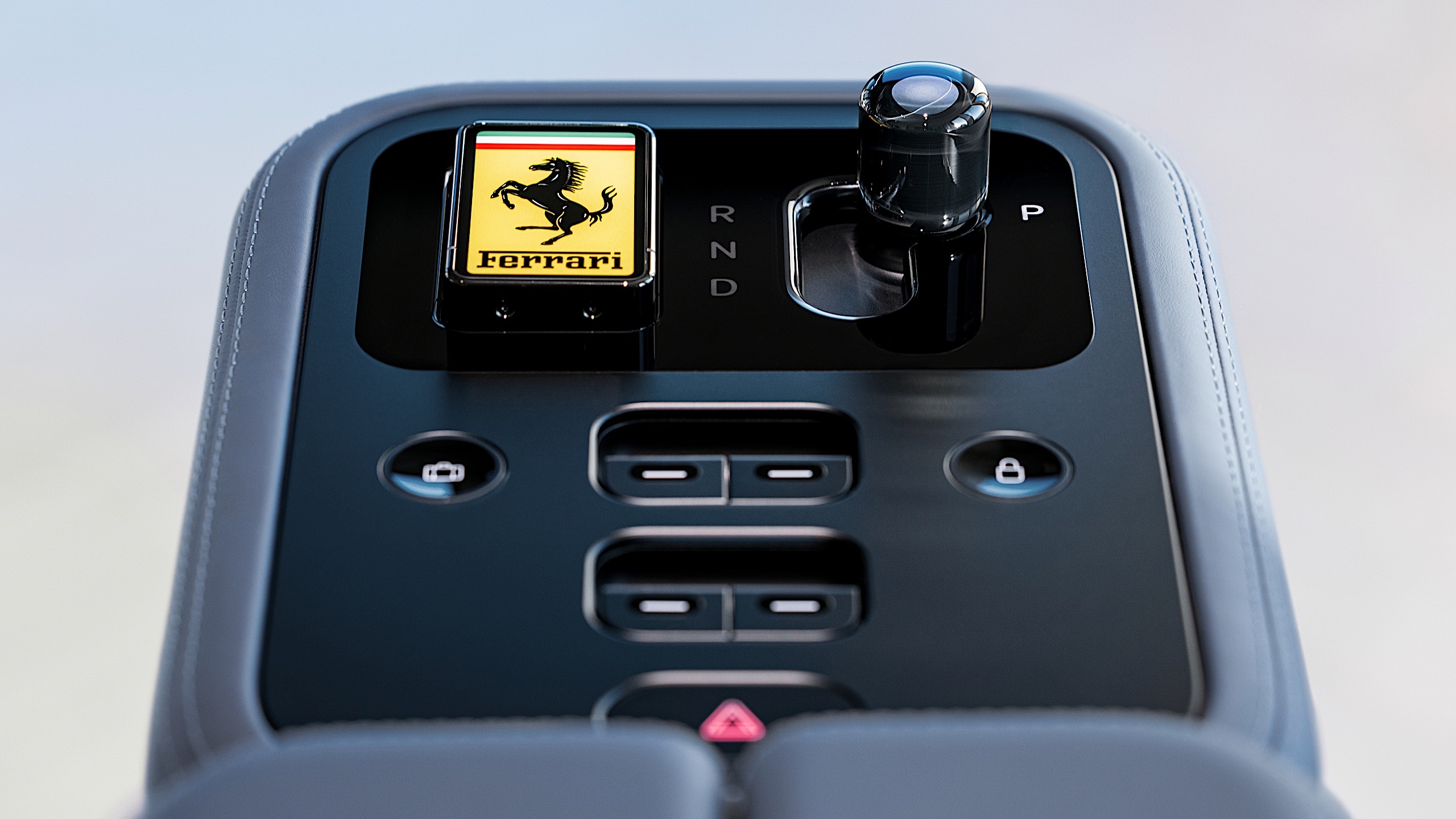
At first blush, it's a bit clinical, but dig deeper, start poking and prodding, and you'll see there's a real sense of charm here. Fun little details and genuinely satisfying tactility begin to reveal themselves. The key, for example, has a yellow panel with an E Ink background. Push the key into the magnetized receiver in the center console, and the yellow on the key dims, moving across to glow through the top of the glass shifter. It's meant to symbolize a sort of transference of life.
The shifter isn't the only thing that's glass. There are 40-odd pieces of Corning Gorilla Glass scattered throughout the cockpit, everything from the shifter surround to the slightly convex lenses in the gauge cluster. What isn't glass is aluminum, much of it anodized in your choice of three colors: gray, dark gray and rose gold.
Yes, all that sure does sound like I'm writing about a new iPhone and not the latest Ferrari. But where Apple has been pruning every physical control it possibly can from its devices lately, LoveFrom will insert some great tactility in the Luce. The shifter moves through its detents satisfyingly, the air vents open and close with a clear snick and the paddles behind the steering wheel pop with a great feel.
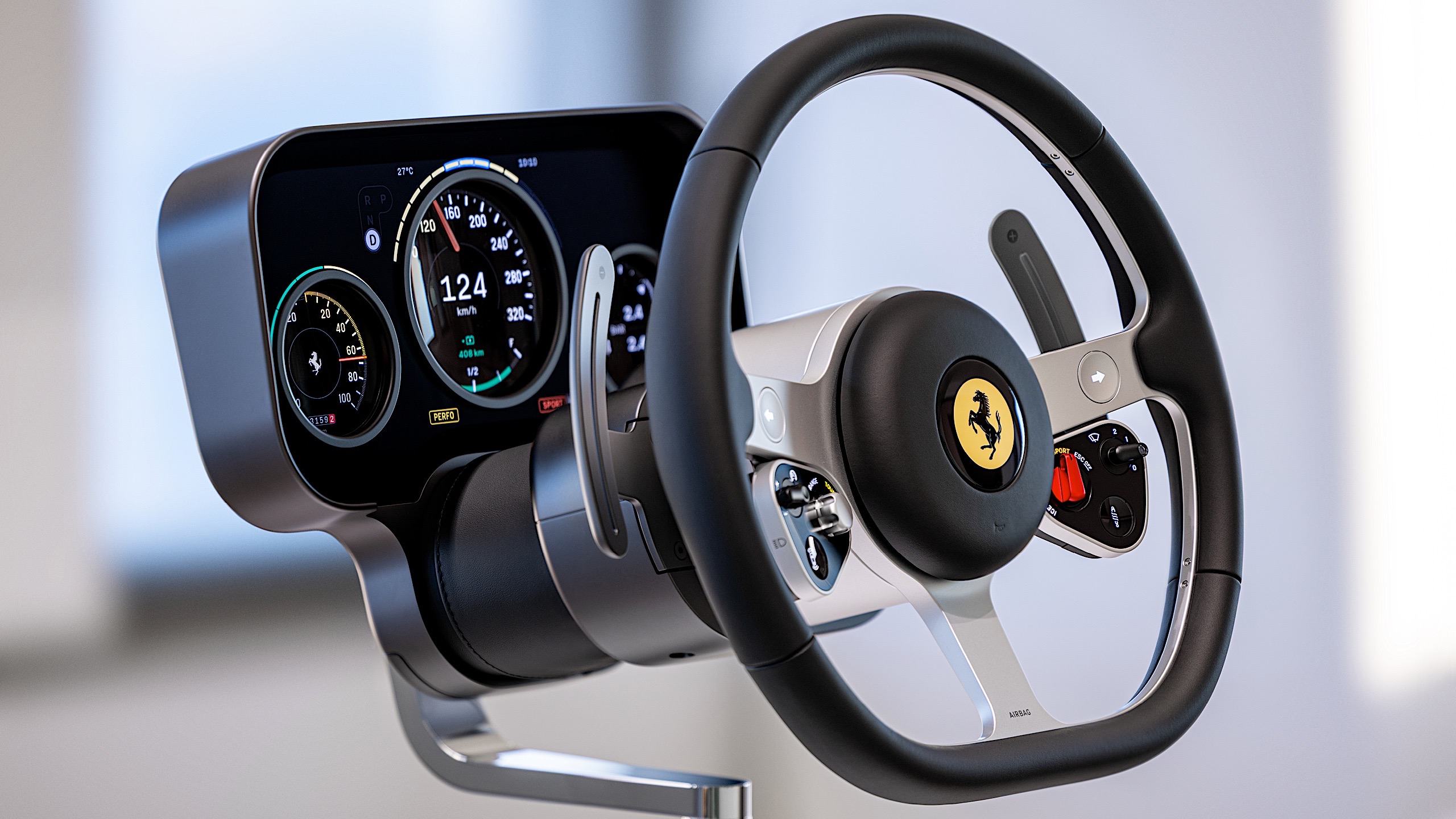
My favorite feature is the windshield wiper control, a little dial in the upper-right of the steering wheel face. It features a tiny lens that magnifies the current setting. It's actually magnifying one of four custom OLED panels, 200 ppi units from Samsung, cut and shaped to deliver LoveFrom's ornate style.
 Ferrari Luce interior designed by LoveFrom
The gauge cluster behind the steering wheel, or binnacle as it's more formally called here, is two OLED displays stacked on top of each other, with a physical needle sandwiched between serving as a pseudo-tachometer for this car without an engine. The gauges change and morph as you move from one mode to the next.
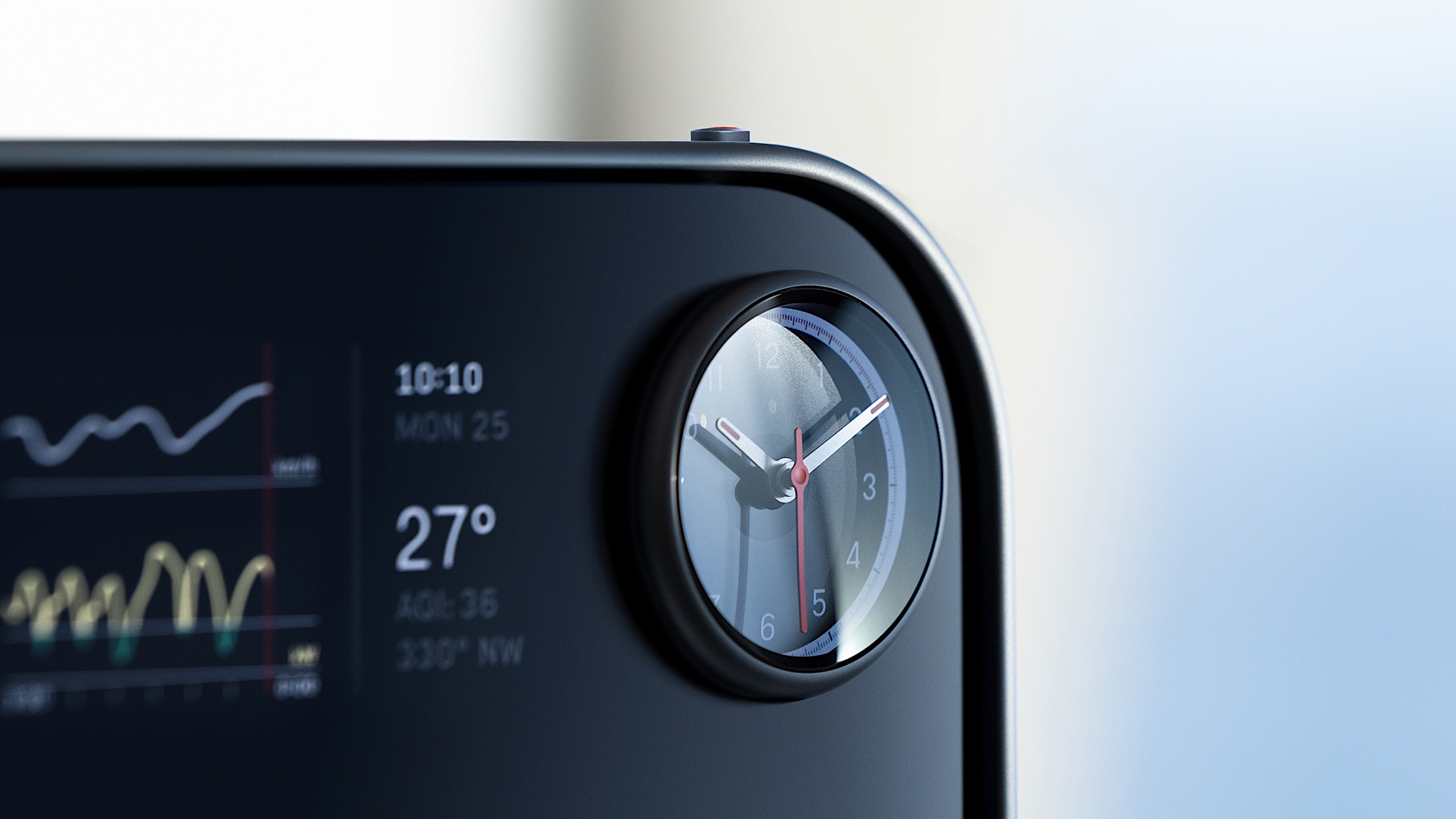
The center display is a 10.12-inch OLED perforated with plenty of holes to allow some pleasingly chunky toggle switches through, plus a glass volume knob. The little clock in the upper-right can turn into a stopwatch or a compass, with its needles swinging about depending on the mode. The whole central control panel pivots and swivels. Just grab the big handle below and drag it where you want it.
The attention to detail on everything is astonishing. Even the rails that hold the seats to the floor are gently shaped and anodized to match the rest of the interior.
Ive was on hand to unveil the interior, clearly a little nervous about showing all this for the first time. After five years of working confidentially on this topic, Ive said he was "enormously excited" and "completely terrified" to provide our first real glimpse at the Luce.
Marc Newson, who founded LoveFrom with Ive, said: "Jony and I share a really, really deep interest in automotive things and vehicles. Actually, I'd go so far as to say that that is probably a hobby of both of ours."
Both Ive and Newson own many vintage machines, and Ive said that modern cars "are missing some things that we love about our old Ferraris." Things like tactility. "It was very clear to us that we needed to figure out as many ways as possible to viscerally and physically connect to the interface," Ive said.
 Ferrari Luce interior designed by LoveFrom
So, while the Luce does have that pivoting touchscreen, it's far from the vehicle's primary interface. Ive said he hopes that physical connection and all the clever touches create a uniquely charming vehicle.
Ive told me that the LoveFrom team has genuinely enjoyed working with Ferrari. "It's been really lovely," he said, and he praised Ferrari CEO Benedetto Vigna's dedication to this project and where it might lead down the road. "Benedetto is an amazing engineer," he said, "he's really interested in what can be learned more broadly."
The biggest challenge might have been working within the automotive industry. Here, design, form and function are key, but safety is of the utmost importance. "It's very hard," Ive told me. "I've never worked in an area that's so regulated. Some of it's great, because you understand why, and people's safety is certainly important, but some of it drives you nuts."
It's far and away the most exciting and fresh interior I've seen outside of the ultra-rare machines like the $4 million Bugatti Tourbillon. But it's so clinically precise and refined that it lacks the rough and raw feel that typifies many classic Ferraris. Whether that's a good or a bad thing will be debated endlessly, and I look forward to reading your comments, but I do figure it'll go a long way to delivering the kind of new clientele that Ferrari must be targeting with the Luce.
 Ferrari Luce interior designed by LoveFrom
Ultimately, whether anyone will want one is hugely dependent on how good the rest of the car looks and how much it will cost. Those are questions we still can't answer, at least not until May, when CEO Vigna says we can expect the Luce's full reveal.
For Ive, though, it seemed like that won't be the end of the road for this automotive journey. "At the end of a project, there are two products. There's what you've made, and there's what you've learned. I've always been fascinated by what you've learned," he told me. "And honestly, we've learned so much."
This article originally appeared on Engadget at https://www.engadget.com/transportation/evs/inside-ferraris-luce-ev-the-jony-ive-interior-is-here-130000211.html?src=rssThe EU could take "interim measures" against WhatsApp as it investigates AI providers' access to the app. On Monday, the EU's regulatory arm announced its "preliminary view" that Meta, WhatsApp's parent company, violated antitrust laws by blocking third-party AI assistants from operating on WhatsApp.
The European Commission's is concerned that Meta's actions will limit competitors from entering the AI assistant market. "We must protect effective competition in this vibrant field, which means we cannot allow dominant tech companies to illegally leverage their dominance to give themselves an unfair advantage," Teresa Ribera, executive vice-president for Clean, Just and Competitive Transition said in a statement.
Ribera continued: "AI markets are developing at rapid pace, so we also need to be swift in our action. That is why we are considering quickly imposing interim measures on Meta, to preserve access for competitors to WhatsApp while the investigation is ongoing, and avoid Meta's new policy irreparably harming competition in Europe."
The issue arose in October when Meta announced updates to its WhatsApp Business Solution Terms. According to the European Commission, the January 15 update would "effectively" make Meta AI the only AI assistant available on WhatsApp. The regulatory agency opened an investigation into the matter on December 4.
Today's update stands as a warning to Meta that the European Commission initially believes the company has violated antitrust regulation. A final decision is still to come. It also gave Meta a chance to respond to the allegations — which it swiftly did.
"The facts are that there is no reason for the EU to intervene in the WhatsApp Business API," a Meta spokesperson told Reuters. "There are many AI options and people can use them from app stores, operating systems, devices, websites, and industry partnerships."
This article originally appeared on Engadget at https://www.engadget.com/big-tech/eu-warns-meta-over-blocking-rival-ai-chatbots-on-whatsapp-121708895.html?src=rssLyft has officially introduced teen accounts for ages 13 to 17. This is a rideshare feature in which teenagers can request their own rides, which is similar to Uber's pre-existing platform.
Teens request the rides on their own, but parents can keep an eye on things every step of the way. Lyft says that parents or guardians can see every ride in real time and manage the account. They also get updates at pickup and drop-off and the app allows communication with the driver when needed.
This is a rideshare service for teens, so there are several new safety features. The drivers must "meet the highest standards" on the platform. Lyft says they get annual background checks and must have "proven safe driving records, positive passenger interactions and experience behind the wheel."
The teens have to enter a PIN to ensure the correct rider gets in the car, which is something Lyft has been experimenting with for adults. Audio recording of the ride is on by default, for an added layer of safety.
Lyft Teen is available right now, though not everywhere. The company has launched the platform in 200 markets, including New York City, Chicago, Atlanta and Miami, among others. It's coming to more cities as the year winds on.
This article originally appeared on Engadget at https://www.engadget.com/apps/lyft-rolls-out-teen-accounts-with-enhanced-safety-protections-110002761.html?src=rssYouTube Music has started putting lyrics — a previously free feature introduced in 2020 — behind a paywall, according to multiple users and 9to5Google. In the latest update, the "Lyrics" tab in the Now Playing screen displays a warning message: "You have [x] views remaining. Unlock lyrics with Premium." Free users get lyrics for five songs, then after that, will only see a few lines before the rest of the song is blurred.
Google has been testing the feature since at least September with a limited number of users, according to previous reports. It's been speculated that YouTube may have made the change to recuperate costs spent with lyric aggregators like Musixmatch. Spotify also put lyrics behind its Premium paywall in 2024, but a user backlash forced it to reinstate the feature for free users.
Google has yet to confirm the change, and while it appears to be a larger rollout, the feature change could still be in testing. YouTube Music's Premium subscription costs $10.99 in the US with ad-free playback, offline downloads, AI features and more — the same as its main rivals Spotify, Apple Music and Amazon Music.
This article originally appeared on Engadget at https://www.engadget.com/entertainment/music/youtube-music-starts-limiting-lyrics-for-free-users-101258311.html?src=rssApple's AirTag makes it easy to keep tabs on everyday items like keys, wallets and bags, but the tracker itself is only part of the equation. The best AirTag accessories help you attach it securely, protect it from wear and tear and fit it naturally into how you carry your stuff. A good holder can make the difference between an AirTag that's always with you and one that's easy to forget.
Accessories range from slim wallet inserts and low-profile key rings to more rugged mounts designed for bikes, luggage or pet collars. Materials vary just as widely, from leather and silicone to hard plastic shells built for travel and outdoor use. Many options also come in multiple colors and finishes, making it easy to balance durability with a look that matches your gear. We've covered the best AirTag accessories available now, so you can find the right fit for how you use your tracker.
AirTag holder FAQs Why do AirTags need a holder?
AirTags need a holder because they do not have built-in keyring holes like Tile, Chipolo and other Bluetooth trackers do.
How do you attach an AirTag to things?You'll need a holder or case to attach an AirTag to your stuff. If you're comfortable slipping an AirTag into an interior pocket of a bag or coat, you can do so without an extra accessory. But if you want to use one to keep track of your keys, wallet, backpack or even your pet on their collar, you'll need an accessory that can accommodate that use case.
Do AirTag holders affect tracking performance?No, AirTag holders should not affect tracking performance.
Do AirTag holders protect against scratches and impacts?Yes, AirTag holders can protect against scratches and impacts. Many AirTag cases encircle the edge of the tracker only, leave the two disk sides exposed. For the most protection, look for an AirTag holder than goes around the entire Bluetooth tracker like a sleeve.
This article originally appeared on Engadget at https://www.engadget.com/computing/accessories/best-apple-airtag-cases-holders-accessories-123036404.html?src=rssApple's iPhone lineup has grown more complicated over the years, with multiple models targeting different kinds of buyers. Some prioritize camera performance and display quality while others focus on design or price, and not everyone needs the most powerful option on the shelf. If you're planning an upgrade, the challenge isn't whether Apple makes a good phone; it's figuring out which iPhone actually makes sense for you based on how you use it.
We test every new iPhone Apple releases, comparing performance, cameras, battery life and long-term value. In this guide, we break down the current lineup to highlight the best iPhones for different needs, from the best all-around picks to more specialized options that trade raw power for affordability or style.
For consistency, our recommendations are based on Apple's standard pricing for unlocked models sold directly through Apple. Deals from carriers, third-party retailers or refurbished sellers can shift the value math, but this guide is meant to help you choose the right model first — then decide where to buy it.
The rest of Apple's iPhone lineup in 2026
Apple is still selling the last-gen iPhone 16 and iPhone 16 Plus for $699 and $799, respectively, but the improvements made with the iPhone 17 have forced both devices into something of a no man's land. The 16 Plus and its 6.7-inch display might be worth it if you want a large-screen iPhone for a much lower price than the iPhone 17 Pro Max, but you'll miss out on the base model's 120Hz always-on display and upgraded dual-camera setup. If you just want a usable iPhone for as little as possible, meanwhile, the iPhone 16e is acceptable for $100 less. In general, we think the iPhone 17 is worth the extra $100; its 6.3-inch display helps it split the difference between the 16 and 16 Plus anyway.
iPhone FAQsThe best time to buy an iPhone, or really any product, is whenever you need one. But if you want to maximize how long your iPhone is considered "current," plan to upgrade in late September. Apple almost always introduces its new core models around then. SE and "e" iPhones, meanwhile, have arrived between February and April, but those aren't guaranteed annual releases.
Cash discounts on new unlocked iPhones are rare, so there usually isn't much reason to wait for a deal before buying (as is often the case with Samsung or Google phones). Carriers will run their own sales, but those typically involve locking you into years-long service plans. The exception would be if you specifically want an older iPhone, since Apple typically cuts the price of its last-gen devices by $100 or more when it introduces a new model. So, for instance, if you know you won't care about the inevitable iPhone 17's upgrades, you could wait until that device is announced and get the iPhone 16 for a little cheaper.
How long does an iPhone last?This depends on the person and how they define "last." If we had to give a broad estimate, we'd say most iPhone users keep their device between two and four years. If you're particularly sensitive to performance and camera improvements, you might want to upgrade on the earlier side of that timeline. If you're not as picky, you could hold out for even longer — though you'll likely want to get a battery replacement sometime around the three- or four-year mark (or whenever you notice your battery life has severely degraded).
Software support shouldn't be a problem regardless: Apple is renowned for keeping its devices up-to-date long-term, and the current iOS 26 update is available on iPhones dating back to 2019. Most of those older phones don't support Apple Intelligence, so there isn't total parity, but that's not a big loss in the grand scheme of things.
How do I know how old my iPhone is?Go to your iPhone's Settings, then tap General > About. You should see the Model Name right near the top. You can also tap the Model Number below that, then verify the resulting four-digit code on Apple's identification page to further confirm.
If you don't want to use software, for whatever reason, you can also find your iPhone's model number printed within its USB-C or Lightning port, if the device lacks a SIM tray. For older devices, you can alternatively find that number within the SIM slot or — if you're still hanging onto an iPhone 7 or older — right on the back of the handset.
Recent updatesSeptember 2025: We've overhauled this guide to reflect the release of the new iPhone Air and iPhone 17 series. The base iPhone 17 is our new top pick for most people, while the iPhone 17 Pro and Pro Max represent the best iPhones you can buy if money is no object. The iPhone Air is worth considering if you care about style above all else, while the iPhone 16e remains acceptable if you want the most affordable new iPhone possible.
August 2025: We've taken another pass to ensure our advice is still up-to-date and noted that we expect to Apple to launch new phones soon in September.
June 2025: We've lightly edited this guide for clarity and added a few common FAQs. Our picks remain unchanged.
February 2025: The new iPhone 16e replaces the iPhone 15 and iPhone 15 Plus as our "budget" pick. We've also removed our notes on the iPhone 14, iPhone 14 Plus, and iPhone SE (3rd generation), as each has been formally discontinued.
January 2025: We've made a few minor edits for clarity and ensured our recommendations are still up to date.
December 2024: We've made a few edits to reflect the release of Apple Intelligence, though our picks remain the same.
This article originally appeared on Engadget at https://www.engadget.com/mobile/smartphones/best-iphone-160012979.html?src=rss The final trailer for Project Hail Mary is here and it's an emotional ride [ 08-Feb-26 9:34pm ]
Amazon MGM just released the final trailer for its upcoming film starring Ryan Gosling, Project Hail Mary, and it provides our first good look at his five-legged alien co-star, Rocky. The movie adapts a 2021 Andy Weir (The Martian) novel of the same name, and follows Dr. Ryland Grace, a scientist who wakes up on a spacecraft far from Earth with no recollection of how he got there or why, only to discover he's on a seemingly impossible mission to stop an extinction event.
If you've read the book, you already know we're in for an emotional rollercoaster with this one, and the latest trailer aptly tugs at our heartstrings with a glimpse of the friendship that grows between Grace and an alien he meets after waking up — and the incredibly high stakes they're facing. The movie will be released nationwide on March 20, but Amazon announced alongside this trailer that it'll be offering tickets for early screenings in premium formats including IMAX, Dolby Cinema, 4DX and 70MM to Prime members. Those screenings will begin on March 16, and tickets go on sale February 20 through Fandango.
This article originally appeared on Engadget at https://www.engadget.com/entertainment/tv-movies/the-final-trailer-for-project-hail-mary-is-here-and-its-an-emotional-ride-213444765.html?src=rss AT&T's budget-friendly phone for kids was designed with parental controls in mind [ 08-Feb-26 8:22pm ]It might be near impossible to be a kid these days without a smartphone, but AT&T wants to offer parents a decent compromise. The wireless carrier launched its AmiGO Jr. Phone, which combines Samsung hardware and AT&T's app, to offer kids a smartphone that has parental controls baked right in.
The AmiGO Jr. Phone is just a Samsung Galaxy A16, which still remains a solid budget smartphone pick with a 50-megapixel main camera, a 6.7-inch display and reliable battery life. However, AT&T tweaked the Samsung hardware into its kid-friendly smartphone by including features like live location tracking, safe zones and screentime restrictions that can be controlled via the AmiGO app. It's not the first time we've seen a smartphone with parental controls, since competitors like Bark and Pinwheel have been on the market for a couple of years now, but it's the first time a major mobile carrier is offering its own standalone product.
As for the AmiGO Jr. Phone, it's now available on AT&T's website for $3 a month, but you'll have to commit to a 36-month contract that provides bill credits. You still have to pay for your monthly service charges as an AT&T customer, but it'll be cheaper than buying a Galaxy A16 outright for $200. For even more security, AT&T also launched its AmiGO Jr. Watch 2 to expand its ecosystem that already includes a tablet designed for kids.
This article originally appeared on Engadget at https://www.engadget.com/mobile/smartphones/atts-budget-friendly-phone-for-kids-was-designed-with-parental-controls-in-mind-202200139.html?src=rss We may see Apple's new iPads and MacBooks in only a matter of weeks [ 08-Feb-26 7:29pm ]It's about that time. Apple is gearing up for a slew of hardware announcements that will include upgrades for the entry-level iPad, iPad Air, MacBook Pro and MacBook Air, according to Mark Gurman's Power On newsletter. In line with what we've seen in recent years, Gurman reports, "A product launch is currently slated for as early as the week of March 2."
Apple unveiled the M5 MacBook Pro in October, bringing the chip first to the 14-inch model. With the coming announcements, we should see the M5 Pro and M5 Max chips finally arrive. Gurman notes that new 14-inch and 16-inch MacBook Pros are on the way, along with a new MacBook Air. We're also likely to see new iPads soon. A new entry-level iPad will be able to support Apple Intelligence thanks to the inclusion of the A18 chip, and the iPad Air will be getting the M4, according to Gurman.
Updates to the Mac Studio and Studio Display are expected to follow, as well as a Mac mini refresh down the line this year. As Gurman previously reported, Apple is also said to be releasing its first "low-cost MacBook" sometime in the very near future.
This article originally appeared on Engadget at https://www.engadget.com/computing/we-may-see-apples-new-ipads-and-macbooks-in-only-a-matter-of-weeks-192953977.html?src=rss Steam now lets developers display the exact date of when their game leaves Early Access [ 08-Feb-26 7:04pm ]Steam is adding a little more transparency when it comes to Early Access games. Announced in a blog post, Steam introduced a new feature for game developers to add the exact date of when their game would leave Early Access and see a version 1.0 launch. According to Steam, this feature stems from developers who requested a way to display an official launch date.
While games still in Early Access give eager players a way to experience the early stages of a title and contribute towards the development, some games have been stalled in this phase for years. With this new feature, players can see a precise launch date displayed on the game's store page just underneath the Early Access Game note. However, game devs can choose a specific date or a more vague timeframe, including displaying only the year of the expected release.
In the blog post, Steam noted that this feature was optional for developers, adding, "just because this feature exists, does not mean you should or must use it." Steam also said that game devs should only offer their player base a concrete date if there's a "very high degree of confidence."
This article originally appeared on Engadget at https://www.engadget.com/gaming/pc/steam-now-lets-developers-display-the-exact-date-of-when-their-game-leaves-early-access-190413701.html?src=rss The iPhone 17e will reportedly bring some key upgrades without raising the price [ 08-Feb-26 5:41pm ]Apple is keeping the entry level for iPhones at $599, according to Bloomberg's Mark Gurman. In the latest Power On report, Gurman said that the iPhone 17e is "due imminently" and will keep the same price as its predecessor.
Considering we're about a year away from the iPhone 16e's announcement, we're due for a successor to Apple's more affordable smartphone. According to Gurman, Apple upgraded the new budget-friendly iPhone with MagSafe charging and the A19 chip that's seen in the iPhone 17 base model. The iPhone 17e will also get Apple's latest in-house cellular and wireless chips, Gurman reported.
In our review of the iPhone 16e, we weren't particularly sold because of its limited camera capabilities, particularly when compared to the iPhone 17's release a few months later. However, for the same $599 price, Apple's iPhone 17e is getting a few notable upgrades and will compete with Google's Pixel 10a. More specifically, Gurman expects Apple to target the emerging economies and enterprise demographics with the iPhone 17e. While Apple faces a lot more competition in overseas markets, iPhone sales have been experiencing a resurgence in China. Apple is even forecasting strong sales for iPhones across Asia, especially in China and India.
This article originally appeared on Engadget at https://www.engadget.com/mobile/smartphones/the-iphone-17e-will-reportedly-bring-some-key-upgrades-without-raising-the-price-174154577.html?src=rss New York lawmakers introduce bill that aims to halt data center development for three years [ 07-Feb-26 10:40pm ]On Friday, New York State Senators Liz Krueger and Kristen Gonzales introduced a bill that would stop the issuance of permits for new data centers for at least three years and ninety days to give time for impact assessments and to update regulations. The bill would require the Department of Environmental Conservation and Public Service Commissions to issue impact statements and reports during the pause, along with any new orders or regulations that they deem necessary to minimize data centers' impacts on the environment and consumers in New York.
The bill would require these departments to study data centers' water, electricity and gas usage, and their impact on the rates of these resources, among other things. The bill, citing a Bloomberg analysis, notes that, "Nationally, household electricity rates increased 13 percent in 2025, largely driven by the development of data centers." New York is the sixth state this year to introduce a bill aiming to put the brakes on data centers, following in the footsteps of Georgia, Maryland, Oklahoma, Vermont and Virginia, according to Wired. It's still very much in the early stages, and is now with the Senate Environmental Conservation Committee for consideration.
This article originally appeared on Engadget at https://www.engadget.com/big-tech/new-york-lawmakers-introduce-bill-that-aims-to-halt-data-center-development-for-three-years-224005266.html?src=rss DOJ is investigating if Netflix used anticompetitive tactics as part of its merger probe [ 07-Feb-26 9:09pm ]Netflix's acquisition of Warner Bros. Discovery isn't quite a done deal yet. As first reported by The Wall Street Journal, the US Department of Justice has started its probe of Netflix's proposed purchase, but is notably interested in whether the streaming giant was involved in any anticompetitive practices. According to the civil subpoena seen by WSJ, the Justice Department is looking into any "exclusionary conduct on the part of Netflix that would reasonably appear capable of entrenching market or monopoly power."
While Netflix announced plans to acquire Warner Bros. Discovery in December at a value of $82.7 billion, the deal was expected to close in 12 to 18 months, subject to required regulatory approvals. The DOJ has the power to block the transaction and this investigation could hint at the agency's approach, which may involve proving that Netflix put its competition at an unfair advantage.
Netflix's attorney, Steven Sunshine, told WSJ that this probe was standard practice and that, "we have not been given any notice or seen any other sign that the DOJ is conducting a separate monopolization investigation." Netflix also said in a statement that it's "constructively engaging with the Department of Justice as part of the standard review of our proposed acquisition of Warner Bros." According to WSJ, the investigation is still in its early stages and could take up to a year to complete.
This article originally appeared on Engadget at https://www.engadget.com/entertainment/streaming/doj-is-investigating-if-netflix-used-anticompetitive-tactics-as-part-of-its-merger-probe-210940856.html?src=rss The State Department is scrubbing its X accounts of all posts from before Trump's second term [ 07-Feb-26 8:55pm ]The State Department is wiping the post history of its X accounts and making it so you'll have to file a Freedom of Information Act request if you want to access any of the content it removed, according to NPR. The publication reports that the State Department is removing all posts from before President Trump's current term — a move that affects several accounts associated with the department, including those for US embassies, and posts from the Biden and Obama administrations. Posts from Trump's first term will be taken down too.
Unlike how past administrations have handled the removal of social media content and the transition of accounts, these posts won't be kept in a public archive. A spokesperson for the State Department confirmed this to NPR, and said the move is meant "to limit confusion on U.S government policy and to speak with one voice to advance the President, Secretary, and Administration's goals and messaging. It will preserve history while promoting the present." The spokesperson also called the X accounts "one of our most powerful tools for advancing the America First goals."
The Trump administration has been purging information from government websites since he took office last year. Just this week, the CIA unexpectedly took down its World Factbook, a global reference guide that's been available on the internet since 1997.
Trump Mobile's T1 Phone is apparently still coming, but it'll be uglier and more expensive [ 07-Feb-26 7:06pm ]Trump Mobile is already failing to deliver on some early promises, according to the latest report from The Verge. The report revealed the near-final design of the T1 smartphone and uncovered some major changes with pricing and manufacturing.
The Verge spoke with Don Hendrickson and Eric Thomas, two of the three execs behind Trump Mobile, about the company's first smartphone, which will get a more expensive price tag and no longer boast being made in the USA. Thanks to a screenshot from the report, we can see that the latest T1 design also changed the camera array, which first resembled the iPhone's but now has three cameras in a misaligned vertical stack.
As for the price, Hendrickson told The Verge that anyone who paid the $100 deposit will still pay $499 total for the T1 as an "introductory price," but that later customers could fork up to $999. Thomas also revealed that the T1 smartphone will go through "final assembly" in Miami and no longer be "proudly designed and built in the United States," as seen in the introductory press release. Instead, the website now shows a description that says, "with American hands behind every device." We still don't have a release date — and now we don't even have a final price — but the website still claims the T1 smartphone will be released "later this year."
This article originally appeared on Engadget at https://www.engadget.com/mobile/smartphones/trump-mobiles-t1-phone-is-apparently-still-coming-but-itll-be-uglier-and-more-expensive-190626835.html?src=rss Analogue unearths N64 prototype colors for its limited edition 3D console [ 07-Feb-26 5:19pm ]Analogue is back with another hit of N64 nostalgia, but with colorways that are deep cuts for even the biggest Nintendo nerds. Analogue announced its latest run of limited edition versions of its 3D console, this time drawing inspiration from a batch of prototype colorways for the original N64 that were manufactured but never hit the market. Now, the Analogue 3D will come in Ghost, Glacier, Extreme Green, Ocean and yes, even Atomic Purple.
It may just be a cosmetic upgrade, but it's worth noting that each of the colorways has matching cables, power adapters and 16GB SD cards that come preinstalled. Analogue even partnered with 8BitDo again to create color-matched controllers that complete the colorful retro experience.
As usual, Analogue said this latest run will be available in "highly limited quantities," starting on February 9 at 11AM ET. Be sure to set a reminder because the first Analogue 3D drop sold out quickly and the Funtastic colorways went out of stock just as fast. According to Analogue, the consoles will go for $299.99 and start shipping 24 to 48 hours after orders are completed. 8BitDo said the $49.99 controllers will be available for preorder at the same time as the 3D console, but see its first shipments starting in April.
This article originally appeared on Engadget at https://www.engadget.com/gaming/nintendo/analogue-unearths-n64-prototype-colors-for-its-limited-edition-3d-console-171923894.html?src=rss NASA is sending Crew-12 astronauts to the ISS on February 11 [ 07-Feb-26 3:30pm ]The Crew-12 astronauts will soon make their way to the ISS, joining the three remaining spacefarers on board after the previous mission was cut short due to a medical concern. NASA was originally planning a February 15 launch date for the mission, but it has moved it up to February 11. It's now targeting a liftoff of no earlier than 6:01 AM Eastern that day from Cape Canaveral in Florida. The crew members are already in quarantine, and if everything goes well on launch day, the Dragon capsule they're on will dock with the orbiting lab at approximately 10:30 AM on February 12.
If you'll recall, NASA decided to bring Crew-11 members back home on January 15, a month earlier than planned, citing a medical concern with one of the members. While the affected astronaut was stable, the ISS didn't have the equipment necessary to be able to diagnose them properly. All four members of Crew-11 flew home, leaving the whole space station in the hands of three people, namely NASA astronaut Chris Williams and two cosmonauts for the Russian side. They will be joined by Crew-12's NASA astronauts Jessica Meir and Jack Hathaway, European Space Agency's Sophie Adenot and Roscosmos cosmonaut Andrey Fedyaev.
SpaceX recently had to ground its Falcon 9 rocket after an issue with its upper stage for a few days, leaving the Crew-12's flight schedule in question. But on February 6, the Federal Aviation Administration cleared it for its next flight. NASA will livestream the mission's prelaunch, launch and docking activities on NASA+, Amazon Prime and on its YouTube channel, with its launch coverage starting at 4AM Eastern time on February 11. You can also bookmark or pin this page to watch the launch below.
This article originally appeared on Engadget at https://www.engadget.com/science/space/nasa-is-sending-crew-12-astronauts-to-the-iss-on-february-11-153000139.html?src=rss How to track your sleep and view your sleep data in Apple Health [ 07-Feb-26 1:00pm ]Apple Health brings sleep tracking, scheduling and long-term analysis into one place, with your iPhone acting as the hub and the Apple Watch doing the overnight monitoring. Once everything is set up, Apple Health can show how long you slept each night, how consistent your sleep schedule is and how much time you spend in different sleep stages. Here is how to get started, track your sleep and review your data.
Sleep tracking in Apple Health relies on two things: You need to set up Sleep in the Health app on your iPhone, and you need a compatible Apple Watch to wear to bed. While you can set sleep schedules without a watch, detailed sleep data — including sleep stages — requires an Apple Watch.
How to set up Sleep in Apple HealthSleep tracking is available on all watchOS 8 (or later) models and setup starts in the Health app on your iPhone. Open Health, tap Browse and then tap Sleep. If this is your first time setting it up, you will see an option to get started. Apple Health will guide you through choosing a sleep goal, setting a bedtime and wake-up time and deciding whether you want one sleep schedule for every day or different schedules for weekdays and weekends.
During setup, you can also enable sleep reminders and a wind-down period. Wind Down reduces distractions before bedtime by activating features like Focus mode and dimming notifications at a set time before sleep. These settings are optional but they help keep your schedule consistent, which improves the quality of the data Apple Health collects over time.
Once Sleep is configured, Apple Health automatically syncs those settings to your Apple Watch. You can adjust your sleep schedule later by returning to the Sleep section in Health and tapping Full Schedule and Options. Any changes you make here update on both your iPhone and Apple Watch.
How to prepare your Apple Watch for sleep trackingTo track sleep, your Apple Watch needs to be worn overnight and have enough battery to last until morning. If the battery drops below 30 percent before bedtime, your watch will prompt you to charge it first. Sleep tracking also relies on Sleep Focus which activates automatically based on your sleep schedule. Once Sleep Focus has been set, open the Settings app on your Apple Watch, tap Sleep and ensure that Track Sleep with Apple Watch is turned on. With both features enabled your watch can monitor sleep automatically without any manual start or stop each night.
Comfort matters when wearing a watch to bed, so many people prefer a softer band for sleep. As long as the watch fits securely and stays in contact with your wrist, it can track sleep without issue.
 The Apple Watch Series 11 on a person's wrist, showing a ring with three segmented arcs encircling a Sleep Score of 53 and the description "OK" in the bottom left.Cherlynn Low for EngadgetHow Apple Watch tracks your sleep
When Sleep Focus is active, the Apple Watch uses its accelerometer and heart rate sensor to detect when you are asleep and awake. Newer models also track sleep stages, including time spent in REM, core and deep sleep. Apple Health combines this information into a single overnight record that appears in the Sleep section the next morning.
You do not need to start or stop sleep tracking manually. As long as you follow your sleep schedule or enable Sleep Focus before bed, the Apple Watch automatically does everything else. If you wake up early or go to bed later than planned, Apple Health adjusts the data based on actual movement and heart rate rather than just your scheduled times. In addition, some Apple Watch models (SE 3 or higher) support on-device Siri, enabling you to ask questions such as "how much sleep did I have last night?" for a more immediate response.
How to view your sleep data in Apple HealthTo see your sleep data, open the Health app on your iPhone and tap Browse, then Sleep. At the top of the screen, you will see a chart showing how long you slept the previous night. Tapping this chart reveals a detailed breakdown, including time asleep, time in bed and sleep stages (if available).
Scrolling down shows trends over longer periods. You can switch between daily, weekly, monthly and six-month views to see patterns in your sleep duration and consistency. Apple Health also highlights whether you are meeting your sleep goal and how regular your schedule has been.
Under Highlights, Apple Health may surface insights such as changes in average sleep time, variations in sleep stages or your nightly sleep score. Sleep scores provide a simplified summary of how well you slept, and is based on factors such as duration, consistency and restfulness. These summaries update automatically as more data is collected over time.
Understanding sleep stages and trendsIf your Apple Watch supports sleep stages, Apple Health displays how much time you spent in REM, core and deep sleep. These stages give context to your overall sleep quality, though Apple emphasizes trends over individual nights. Occasional short nights or unusual stage distributions are normal.
Over time, Apple Health makes it easier to spot patterns. Consistently short sleep durations, irregular bedtimes or frequent awakenings become clearer when viewing weekly or monthly summaries. This makes the Sleep section useful not just for nightly check-ins but for understanding longer-term habits.
Editing and managing sleep dataApple Health allows you to add or edit sleep data if needed manually. In the Sleep section, tap Add Data to log sleep that was not recorded automatically. This can be useful if you forget to wear your watch or take a nap without it.
You can also manage which devices contribute sleep data by scrolling to the bottom of the Sleep screen and tapping Data Sources and Access. This is helpful if you use third-party sleep apps or multiple devices.
Once set up, sleep tracking in Apple Health runs quietly in the background. With a consistent schedule and a charged Apple Watch, your sleep data builds into a clear picture of your nightly rest, all stored securely within Apple's health platform.
This article originally appeared on Engadget at https://www.engadget.com/mobile/smartphones/how-to-track-your-sleep-and-view-your-sleep-data-in-apple-health-130000023.html?src=rss Engadget review recap: Shokz OpenFit Pro, Nex Playground, Sony A7 V and more [ 07-Feb-26 12:34pm ]We're starting to hit our stride in 2026. Now that February is here, our reviews team is flush with new devices to test, which means you've got a lot to catch up on if you haven't been following along. Read on for a roundup of the most compelling new gear we've tested recently from gaming, PCs, cameras and more.
Nex Playground
If you still have a fondness for the Xbox Kinect, the Nex Playground might be right up your alley. Senior reporter Devindra Hardawar recently put the tiny box through its paces and found an active gaming experience that's fun for the whole family. "While I have some concerns about the company's subscription model, Nex has accomplished a rare feat: It developed a simple box that makes it easy for your entire family to jump into genuinely innovative games and experiences," he wrote.
MSI's Prestige 14 Flip AI+
Devindra also tested MSI's latest laptop, the powerful Prestige 14 Flip AI+. While the machine got high marks for its performance, display and connectivity, he noted that the overall experience is hindered by subpar keyboard and truly awful trackpad. "As one of the earliest Panther Lake laptops on the market, the $1,299 Prestige 14 Flip AI+ is a solid machine, if you're willing to overlook its touchpad flaws," he explained. "More than anything though, the Prestige 14 makes me excited to see what other PC makers offer with Intel's new chips."
Shokz OpenFit Pro
Fresh off of its Best of CES selection, I conducted a full review of the OpenFit Pro earbuds from Shokz. I continue to be impressed by the earbuds' ability to reduce ambient noise while keeping your ears open. And the overall sound quality is excellent for a product that sits outside of your ears.
Sony A7 V
Contributing reporter Steve Dent has been busy testing cameras to start the year. This week he added the Sony A7 V to the list, noting the excellent photo quality and accurate autofocus. "The A7 V is an incredible camera for photography, with speeds, autofocus accuracy and image quality ahead of rivals, including the Canon R6 III, Panasonic S1 II and Nikon Z6 III," he said. "However, Sony isn't keeping up with those models for video."
Apple AirTag (2026)
Our first Editors' Choice device of 2026 is Apple's updated AirTag. All of the upgrades lead to a better overall item tracker, according to UK bureau chief Mat Smith. "There's no doubt the second-gen AirTags are improved, and thankfully, upgrading to the new capabilities doesn't come at too steep a cost," he concluded.
This article originally appeared on Engadget at https://www.engadget.com/engadget-review-recap-shokz-openfit-pro-nex-playground-sony-a7-v-and-more-123400089.html?src=rss Hotline Miami meets football, the power of video editing and other new indie games worth checking out [ 07-Feb-26 12:00pm ]Welcome to our latest roundup of what's going on in the indie game space. As always, we've got a bunch of neat games to tell you about. Perhaps I'll tear myself away from playing as Chappell Roan in Fortnite or Jetpack Cat in Overwatch long enough to check more of them out.
Thanks to the folks at Aftermath, I learned about a short, text-based game from Woe Industries from a while back called You Have Billions Invested In Generative AI. Surprisingly enough, you take on the role of a venture capitalist who has plowed gobs of money into genAI technology and might be starting to have doubts about that investment. Other characters warn you about the dangers of the tech and real-life headlines showing the impact of genAI hallucinations pop up. It's tagged as a horror game, for what it's worth.
It's both satirical and all too real, and it's pretty funny. Plus, any game that allows me to yell at Noam Chomsky is A-OK in my book. You can play You Have Billions Invested In Generative AI for free on Itch.io.
New releasesTackle for Loss had a very timely arrival this week, just ahead of a certain other big, real-life game. This is a football-themed take on action-heavy, top-down games like Hotline Miami. Developer Indifferent Penguin took some inspiration from the Taken film series as well — you take on the role of a CTE-afflicted former football player who sets out to rescue his kidnapped daughter.
The combat sounds pretty interesting here. You need to clear out all of the bad guys on each floor of a multistory building before you can progress, but you only have four offensive actions at your disposal each time (this draws from the four-down format of football). You'll need to plan things out before you go on the attack, not least because your character and the enemies all die in a single hit.
Tackle for Loss is out now on Steam. It'll usually run you $11, but it's 15 percent off until February 12.
Trust Me, I Nailed It is an intriguing turn-based strategy game from Team Afternoon and publisher Jungle Game Lab. A useless warrior hires you as a video editor to make them look like a true hero capable of slaying any beast.
Enemy attacks and other actions appear on the edit timeline as pre-recorded footage, and the idea is to plot out the warrior's movements around those. You have post-processing visual effects tricks at your disposal, so you can let the warrior teleport and convert low-power strikes into critical hits.
It's a fun idea, and a reminder (as if we should need one in the current climate) not to always take videos at face value. Trust Me, I Nailed It is on Steam now and it's free-to-play.
Tomb of the Bloodletter is a spin on the roguelike deckbuilder genre that I haven't really seen before. Your deck consists of magic powers that are applied to letters of the alphabet. Spelling out words using these Magicks can result in powerful combinations, particularly if you use the same letter multiple times. That's right, this is a typing game — a roguelike deckbuilder that the likes of Wordle players might be interested in.
It's really about coming up with words that put the right letters in a specific order. For instance, certain letters are more effective if you place them at the end of a word. So, this should get your brain ticking.
Tomb of the Bloodletter — from Ethan's Secretions and indie.io — debuted during the Steam Typing Fest. It'll typically cost $8, but there's a 20 percent discount until February 19.
UpcomingShadowstone is an upcoming turn-based tactical co-op roguelike for up to four players from developer Secret Door and Dreamhaven (Blizzard co-founder and ex-CEO Mike Morhaime's company). It's set in the same universe as Secret Door's Sunderfolk.
The action plays out on a hexagonal board with randomized rooms and enemies. Positioning will be key, and finding synergies between the abilities of the playable characters will put you in good stead.
Shadowstone will hit Steam in early access later this year for $15. It's also coming to the Epic Games Store.
Meanwhile, a major update for Sunderfolk is set to go live on March 10. It will introduce a new tank-style character and two fresh sets of missions. Secret Door will also add two much-requested features to PC versions: online multiplayer and — so you don't have to use your phone to play the game anymore — mouse and keyboard controls.
I really loved Planet of Lana and the sequel is among my most-anticipated games of this year. There's now a release date for the upcoming puzzle platformer. Wishfully and Thunderful Publishing are bringing it to Steam, Xbox, PlayStation and Nintendo Switch on March 5. It'll also be on Game Pass on day one.
A Planet of Lana II: Children of the Leaf demo will hit Steam, Xbox and PlayStation on February 11. It will arrive on Switch a bit later.
Is Sticker/Ball the first Ball x Pit-like? I'm not entirely sure. Still, it is now firmly on my radar. Instead of firing balls at a horde of constantly-advancing enemies, here you'll shoot them at dice to earn points. You'll unlock stickers that can be applied to said dice and they'll interact with each other too. For instance, spiders can create webs and these can catch flies that are attracted to poop stickers.
The trailer describes another interaction, "frog jumped and triggered cigarette pack." Frogs can also hijack spaceships, apparently, and there's a bouncing DVD (well, "VID") logo. There are more than 100 types of stickers and dozens of different enemies.
I don't really understand what's going on in the trailer, but it's somehow making my brain happy, so this is going on my wishlist. Solo dev Bilge is behind Sticker/Ball, which is coming to Steam soon through the help of publisher Future Friends Games. A demo is available now, so that's my weekend sorted.
Skate City has long been one of the best games on Apple Arcade. Its creator, Daniel Zeller, (Zellah Games) has revealed a new project. Skate Style is billed as a "next-gen skateboarding game with high-end graphics." You'll be able to take to the virtual streets of Barcelona and Prague to show off your best moves.
What could help Skate Style really stand out from the pack is the animation editor, which enables you to create completely new tricks. The game is slated to have an "advanced" character creation tool as well as mod support, so there'll be a high level of customization available.
A Skate Style demo is available on Steam now. The full game should land on PC later this year. Here's hoping the soundtrack can match up to those from the Tony Hawk's Pro Skater series.
Crimson Capes is billed as a 2D Soulslike action RPG with four playable characters, elemental magic, more than 25 bosses, swordfighting, lots of secrets, co-op, optional hunts with randomized dungeons and invasions from other players. That all sounds neat enough, but most exciting to me here is the pixel-art, rotoscoped animation work. It looks modern and retro at the same time, and I'd love to see this sort of style in more games. I also dig that you get a PDF instruction manual and game guide as well as a printable world map when you buy the game.
You (and I) won't have to wait long to play Crimson Capes, which is from Poor Locke. It's coming to Steam on February 12 for $15, though you'll get 10 percent off if you pick it up within the first nine days. Console versions are in the pipeline too.
This article originally appeared on Engadget at https://www.engadget.com/gaming/hotline-miami-meets-football-the-power-of-video-editing-and-other-new-indie-games-worth-checking-out-120000628.html?src=rss The Crypto.com guy bought AI.com (and a Super Bowl ad) [ 06-Feb-26 11:43pm ]Kris Marszalek, CEO and co-founder of crypto and stock trading platform Crypto.com, has bought an expensive website. In this case it's AI.com, valued at one point at $100 million, which will serve as the online home for his new company of the same name. The website launch is being paired with a Super Bowl ad that will air this Sunday.
AI.com's main offering is an AI agent that "operates on the user's behalf — organizing work, sending messages, executing actions across apps, building projects, and more." It's a similar concept to what companies like OpenAI, Anthropic and Google are promising with their own agents and agentic features, and notably lacking in hard details. Users can make multiple agents with AI.com and have them do a variety of tasks — the company's press release mentions trading stocks and updating a dating profile, for example — while remaining permission-based and private. It's not clear if AI.com is offering its own AI models or licensing those offered by other companies, but clearly whatever it offers, both for free and via a planned paid subscription, will be flexible.
Like Crypto.com's big push into the mainstream during late 2021 and early 2022, AI.com is arriving at a particularly hype-filled time in the AI industry. Anthropic's Claude Code and Claude Cowork tools have been taken up as evidence that AI might actually make people more productive, so AI.com's decision to push an agent of its own is timely.
Of course, after Crypto.com's big Matt Damon ad in 2021, and Super Bowl ad in 2022, Bitcoin prices hit an all-time low in June 2022. Ironically, Marszalek's AI.com is also launching during a particularly nasty "crypto winter" which has lowered the price of Bitcoin to under $66,000, a steep drop from the $127,000 it cost in October 2025. That's not to suggest the AI.com CEO is a groundhog for deflating hype balloons. More likely, it's a sign that the future of AI could be as unpredictable and volatile as cryptocurrency.
This article originally appeared on Engadget at https://www.engadget.com/ai/the-cryptocom-guy-bought-aicom-and-a-super-bowl-ad-234325394.html?src=rss Apple will reportedly allow third-party AI assistants in CarPlay [ 06-Feb-26 9:34pm ]Apple plans to allow third-party voice-controlled AI apps in CarPlay, Bloomberg reports. Siri is the default voice assistant for things like controlling music and looking up directions, but future AI apps in CarPlay could handle the complicated, open-ended requests Siri can't answer.
The expanded support would let developers like OpenAI or Google offer versions of their ChatGPT and Gemini apps for CarPlay. Similar functionality is possible just by connecting a smartphone to a car over Bluetooth and using an AI app's voice mode, but CarPlay support would presumably make the process a little more seamless.
Not so seamless that it replaces Siri, however. Bloomberg writes that these third-party apps won't be able to replace the Siri button in the CarPlay interface or use their own wake words ("Hey Google," etc.). Instead, anyone who wants to spend a long drive talking to Gemini will have to open the app first. That could cut down on the utility of using one of these apps, but Apple presumably wants to get Siri to a place where CarPlay users prefer it as their in-car assistant anyway.
Apple and Google recently announced that Gemini would power future versions of Siri and Apple Foundation Models, the AI models underpinning Apple Intelligence. The delayed, updated version of Siri Apple introduced alongside Apple Intelligence in 2024 is supposed to be able to take actions on user's behalf, work across apps and understand the context of what's on screen, all things Gemini can currently do. Reports suggest Apple wants to eventually use Google's Gemini models to transform Siri into a proper conversational chatbot, too. That future version of the voice assistant could be right at home in CarPlay.
This article originally appeared on Engadget at https://www.engadget.com/transportation/apple-will-reportedly-allow-third-party-ai-assistants-in-carplay-213432646.html?src=rss Disney+ loses access to Dolby Vision and HDR10+ in some European countries [ 06-Feb-26 7:39pm ]Disney+ subscribers in some European countries have lost access to advanced HDR features like Dolby Vision and HDR10+, TechRadar and FlatpanelsHD report. The issue was first spotted by German Disney+ subscribers on Reddit, but currently also impacts subscribers in Portugal, Poland, France and the Netherlands, according to FlatpanelsHD.
"Dolby Vision support for content on Disney+ is currently unavailable in several European countries due to technical challenges," Disney said in a statement. "We are actively working to restore access to Dolby Vision and will provide an update as soon as possible. 4K UHD and HDR support remain available on supported devices."
If the issue is in fact a technical one, it seems like it could be around for the long-term. Disney has removed any reference to Dolby Vision from its Disney+ video quality support page in Germany. As of now, the company lists HDR10 as its default HDR format, despite Dolby Vision support being a feature of Disney+ for several years now.
FlatpanelsHD writes that the real issue might be legal, rather than technological. A company called InterDigital won an injunction in a German court against Disney in November 2025 because it violated at least one of the company's patents on streaming video technology. The injunction specifically requires Disney to stop violating InterDigital's patent on "a method for dynamically overlaying a first video stream with a second video stream comprising, for example, subtitles." It's not entirely clear how that plays into the company offering Dolby Vision and HDR10+ in Europe, but it would explain why subscribers in Germany were some of the first people to notice Dolby Vision's absence.
Engadget has contacted Disney for more information about Disney+'s missing HDR support and whether InterDigital's injunction played a role. We'll update this article if we hear back.
Mentions of Dolby Vision and HDR10+ were also stripped out of the US version of Disney+'s video quality support page. InterDigital hasn't won an injunction in the US, but the company is pursuing a patent case against Disney in the United States District Court for the Central District of California. That doesn't necessarily mean Dolby Vision support will be taken from US subscribers next, but it does suggest there's more happening here than just technical challenges.
This article originally appeared on Engadget at https://www.engadget.com/entertainment/streaming/disney-loses-access-to-dolby-vision-and-hdr10-in-some-european-countries-193930091.html?src=rss The new trailer for The Super Mario Galaxy Movie shows Yoshi absolutely devouring a Magikoopa [ 06-Feb-26 7:18pm ]The long wait for The Super Mario Galaxy Movie is nearly over, as the film hits theaters on April 1. To keep the hype train rolling, Illumination and Universal Pictures have dropped a short new teaser. It's exactly 30 seconds long, so you'll probably be seeing it again on TV this Sunday during the Super Bowl.
It does feature some nifty footage that we haven't seen before, including a hungry Yoshi absolutely devouring a Magikoopa. There are also shots highlighting the star cannons from The Super Mario Galaxy games and one shot that shows Rosalina bodying Bowser Jr.
There seems to be a plot point in which Princess Peach and Toad head to some sort of sci-fi mega-city, which should be fun. There's an Octoomba living there, another shout-out to the OG Wii game.
As previously stated, the hotly-anticipated sequel arrives on April 1. The Super Mario Bros. Movie was a total smash, grossing nearly $1.4 billion and becoming one of the most successful animated films ever made. We found the original to be a fun, but safe, trip to the Mushroom Kingdom.
This article originally appeared on Engadget at https://www.engadget.com/entertainment/tv-movies/the-new-trailer-for-the-super-mario-galaxy-movie-shows-yoshi-absolutely-devouring-a-magikoopa-191807037.html?src=rss Noble Audio has released a USB-C Bluetooth dongle for high fidelity transmission [ 06-Feb-26 7:16pm ]Noble Audio has announced the Sceptre, a pocket-sized USB-C Bluetooth transmitter meant to boost wireless audio quality from phones, laptops and tablets. The device is intended to exceed the quality offered by a device's existing hardware.
Sceptre is powered by Qualcomm's QCC5181 Bluetooth chipset and supports LDAC, aptX Adaptive, AAC and SBC codecs. Of course, to take advantage of the high quality codecs you'll need a pair of headphones that support them. The dongle has a reported wireless range of roughly 66 feet.
Listeners use the Noble app for initial pairing and can then move the dongle between compatible USB-C devices. It also supports pass-through charging with USB-C so users can charge their devices while listening. The company says Sceptre is compatible with iOS, Android and Windows, and the company confirmed with Engadget that iPhones 15 and newer are supported.
We've been pleased in the past with Noble Audio products, like the FoKus Apollo headphones, or the FoKus Rex5 earbuds. The Sceptre from Noble Audio is available for $70.
This article originally appeared on Engadget at https://www.engadget.com/audio/noble-audio-has-released-a-usb-c-bluetooth-dongle-for-high-fidelity-transmission-191655786.html?src=rss
The best live TV streaming services to cut cable in 2026 [ 06-Feb-26 5:01pm ]People who are interested in a live TV streaming service are probably looking for one (or all three) of the following: current sports matchups, breaking news and cable-like channels. We tried all the major providers to see what you get for your monthly bill — particularly in light of the fact that every live TV streamer has raised prices over the past year or two. That said, in most markets, a live TV streaming service is still more cost-effective than cable. And you still don't have to sign a contract. Right now, we think YouTube TV is the most well-rounded option — but the others might have more of what you're looking for. Here are the best live TV streaming services based on our testing.
Editor's note: The blackout of NBC channels on Fubo's service continues, with no end in sight. That means fans hoping to catch the Super Bowl will need to look elsewhere. We've detailed your options below.
How to watch the 2026 Super Bowl with a streaming service
This year, the Super Bowl will take place on Sunday, February 8, 2026 at Levi's Stadium in Santa Clara, California. NBC has the rights to air the broadcast, which means you can watch it with a live TV streaming subscription to YouTube TV, Hulu + Live TV or DirecTV. Sling Blue plans include NBC in certain markets only. NBC channels are dark on Fubo as the company and NBC are still in negotiations. The traditional streaming service Peacock, which is owned by NBC, will also air the game. Those plans start at just $8 per month, which is nearly the cheapest way to watch. However, if you have a digital antenna, you can pick up the game's broadcast signal from your local NBC affiliate for free.
How can I stream NFL games for free?If you have a digital antenna hooked up to your TV, you can grab games that are broadcast over the airways for your region by tuning into your local CBS, Fox, NBC and ABC stations. You can buy a digital antenna for between $20 and $60.
Alternatively, you can check out your local sports bar and watch the game for the price of a soda and maybe some nachos. As it turns out, bars and restaurants that provide those games to customers have to pay a ton of cash to do so, so you may as well take advantage of the opportunity.
Will Peacock stream the Super Bowl?Yes. Peacock is owned by NBC Universal, which holds the rights to stream the big game this year. The Super Bowl will stream on both Peacock (all tiers) and local NBC stations (Premium Plus tier). The cheapest tier of Peacock's service starts at $8 per month.
Can you stream live football on YouTube?September 5, 2025 marked the first time YouTube was an official live NFL broadcaster when it aired the Friday night, week-one game of the 2025 NFL season from São Paulo, Brazil. It pit the Los Angeles Chargers against the Kansas City Chiefs (LA won 21-27) and aired worldwide on YouTube for free as well as for subscribers to YouTube TV.
There are no other plans for YouTube to air live NFL games for the 2025-6 season for free.
Best free live TV streaming services for 2026There are loads of ways to get free TV these days. To start, many standard streaming apps have added live components to their lineups — even Netflix. Peacock Premium Plus subscriptions include regional NBC stations. Paramount+ Premium subscribers can watch on-air CBS programming. The new Fox One service includes multiple live Fox stations. True, if you're already paying for a service it's not technically "free" but at least the live content isn't extra.
The smart TV operating system (OS) you use likely provides free live content too: Amazon's Fire TV, Google/Android TV, Roku's built-in Roku Channel and Samsung's TV Plus all have hundreds of live channels and original programming. Some of the paid services we recommend above have a free version — namely Sling Freestream, Fubo Free (available after you cancel) and DirecTV's MyFree. But if you're looking for more, here are the best free ad-supported TV (FAST) apps with live TV that we tried:
What to look for in a live TV streaming service How to stream live TV
Streaming live TV is a lot like using Netflix. You get access through apps on your phone, tablet, smart TV or streaming device and the signal arrives over the internet. A faster and more stable connection tends to give you a better experience. Most live TV apps require you to sign up and pay via a web browser. After that, you can activate the app on all of your devices.
Monthly PriceWhen I started testing these cord-cutting alternatives, I was struck by the price difference between live TV and a standard video streaming app. Where the latter cost between $5 and $20 per month, most live TV services hit the $80 mark and can go higher than $200 with additional perks, channel packages and premium extras. The higher starting price is mostly due to the cost of providing multiple networks — particularly sports and local stations. And, in the past year or so, every service has raised base plan prices.
Local channelsOnly two of the services I tried don't include full local channel coverage for subscribers and one of those makes no effort to carry sports at all. That would be Philo and, as you might guess, it's the cheapest. The next most affordable option, Sling, only carries three local stations — and only in larger markets — but it still manages to include some of the top sports channels.
When you sign up with any provider that handles local TV, you'll enter your zip code, ensuring you get your area's broadcast affiliates for ABC, CBS, FOX and NBC. Of course, you can also get those stations for free. Nearly all modern television sets support a radio frequency (RF) connection, also known as the coaxial port, which means if you buy an HD antenna, you'll receive locally broadcast stations like ABC, CBS, PBS, FOX and NBC. And since the signal is digital, reception is much improved over the staticky rabbit-ears era.
But local channel access is another area where traditional streaming services, like Netflix, are bleeding into broadcast territory. For example, you can watch your local NBC station with a Peacock subscription and you can tune into your area's CBS station through your Paramount+ subscription. Netflix is even getting into the mix with a recently announced deal with one of France's broadcast companies, TF1. The streaming service will now air TF1's live TV channels and on-demand content inside the Netflix app. No word if the concept will expand to other regions, but it's an interesting move to anyone interested in the future of streaming.
Live sports coverageOne reality that spun my head was the sheer number and iterations of sports networks in existence. Trying to figure out which network will carry the match-up you want to see can be tricky. I found that Google makes it a little easier for sports fans by listing out upcoming games (just swap in NBA, NFL, MLB, NHL and so on in the search bar). When you click an event, the "TV & streaming" button will tell you which network is covering it.
That just leaves figuring out if your chosen service carries the RSNs (regional sports networks) you want. Unfortunately, even with add-ons and extra packages, some providers simply don't have certain channels in their lineups. It would take a lawyer to understand the ins and outs of streaming rights negotiations, and networks leave and return to live TV carriers all the time. That said, most major sporting events in the US are covered by ESPN, Fox Sports, TNT, USA and local affiliates.
I should also point out that traditional streaming services have started adding live sports to their lineups. Peacock carries live Premier League matches, Sunday Night Football games and aired the 2024 Olympic Games from Paris. Thursday Night Football as well as NBA and WNBA games are on Amazon Prime and Christmas Day Football airs on Netflix. HBO Max (formerly, er, HBO Max) now airs select, regular season games from the NHL, MLB, NCAA and NBA with a $10-per-month add-on.
You can watch MLS games with an add-on through the Apple TV app, and Apple TV+ (now just called Apple TV) includes some MLB games. Roku users can watch the just-added free sports channel and those who subscribe to Paramount Plus can see many of the matches aired on CBS Sports, including live NFL games. In 2025, January's Super Bowl was live-streamed for free on Tubi. While all of these alternatives may not cover as much ground as live TV streamers, they could end up being cheaper avenues to the sports you want.
And if sports is all you're after, there are sports-only plans that are a touch cheaper, too. The promised sports streaming service from ESPN, Fox and Warner Bros. called Venu was cancelled early this year. But on August 21, ESPN launched its own streaming service that includes all ESPN channels and costs $30 per month. Fubo Sports is $56 monthly and includes local broadcast stations from ABC, CBS and FOX plus a slew of sports networks (CBS Sport and FS1 among them) as well as all networks included with ESPN Unlimited.
Fox launched its own standalone service in August as well and it includes Fox Sports and all other Fox properties (News, Business, Weather) for $20 monthly. DirecTV also has a $70-per-month, sports-only streaming package called MySports and Comcast has a sports and news bundle for that same price (as long as you're an Xfinity customer with auto-pay, otherwise it's more expensive).
Traditional cable networks
Dozens of linear programming networks were once only available with cable TV, like Bravo, BET, Food Network, HGTV, CNN, Lifetime, SYFY and MTV. If you only subscribe to, say, Netflix or Apple TV+, you won't have access to those. But as with sports, standard streamers are starting to incorporate this content into their offerings. After the Warner Bros. merger, Max incorporated some content from HGTV, Discovery and TLC. Peacock has Bravo and Hallmark shows, and Paramount+ has material from Nickelodeon, MTV and Comedy Central.
Other entertainment channels like AMC+ have stand-alone apps. The Discovery+ app gives you 15 channels ad-free for $10 per month (or with ads for $6 monthly). And a service called Frndly TV starts at a mere $7 per month and streams A&E, Lifetime, Game Show Network, Outdoor Channel and about 35 others. Of course, most live TV streaming options will deliver more sizable lists of cable networks, but just note that you may already be paying for some of them — and if all you need is a certain channel, you could get it cheaper by subscribing directly.
On-demand streamingMost live TV subscriptions include access to a selection of video-on-demand (VOD) content, like you would get with a traditional streaming service. Much of this content is made up of the movies and TV series that have recently aired on your subscribed networks. This typically doesn't cover live events and news programming, but I was able to watch specific episodes of ongoing shows like Top Chef or BET's Diarra from Detroit. Just search the on-demand library for the program, pick an episode and hit play.
Partnerships, like Hulu's relationship with Disney, and add-ons, such as bundling Max with your YouTube TV subscription or Starz with your Sling plan, will let you watch even larger libraries of on-demand content. But again, if VOD is all you're after, paying for those networks directly instead of through a live TV plan will be far cheaper.
Digital video recordings (DVR) limitsEvery option I tried offers some cloud DVR storage without needing a separate physical device. You'll either get unlimited storage for recordings that expires after nine months or a year, or you'll get a set number of hours (between 50 and 1,000) that you can keep indefinitely. Typically, all you need to do is designate what ongoing TV series you want to record and the DVR component will do all the hard work of saving subsequent episodes for you to watch later. You can do the same thing with sports events.
Aside from being able to watch whenever it's most convenient, you can also fast-forward through commercials in recorded content. In contrast, you can't skip them on live TV or VOD.
Simultaneous streams and profiles per accountEach plan gives you a certain number of simultaneous streams, aka how many screens can play content at the same time. And while most providers will let you travel with your subscription, there are usually location restrictions that require you to sign in from your home IP address periodically. Stream allowances range from one at a time to unlimited screens (or as many as your ISP's bandwidth can handle). Some plans require add-ons to get more screens.
Most services also let you set up a few profiles so I was able to give different people in my family the ability to build their own watch histories and libraries, set their favorite channels and get individual recommendations.
Picture-in-picture mode and multiviewPicture-in-picture (PiP) usually refers to shrinking a video window on a mobile device or computer browser so you can watch it while using other apps. Sling, YouTube TV, FuboTV, Philo, DirecTV Stream and Hulu + Live TV all have PiP modes on computers and mobile devices.
Another feature, multiview, lets you view multiple (usually four) sports matches or other live content at once on your TV screen. YouTube TV, FuboTV and now DirecTV all let you do this. With YouTube TV, you can select up to four views from a few preset selection of streams. FuboTV offers the same feature, but only if you're using an Apple TV or Roku streaming device. DirecTV lets you do so through "mixes" which include sports, news, business and kids variants with a set four channels in each mix.
4K live streamsRight now, just FuboTV, YouTube TV and DirecTV Stream offer 4K live streams — but with caveats. YouTube TV requires a $20-per-month add-on, after which you'll only be able to watch certain live content in 4K. DirecTV Stream has three channels that show live 4K content — one with shows and original series, and two with occasional sporting events. You don't have to pay extra for these but you do need to have either DirecTV's Gemini receiver, or a device from Fire TV, Apple TV or Roku. You'll need those same streaming devices to watch the select 4K programming on Sling as well. FuboTV shows certain live events in 4K but access is limited to the Elite and Premier packages, not the base-level Pro plan.
Of course, watching any 4K content also requires equipment that can handle it: a 4K smart TV or 4K streaming device paired with a cord and screen that can handle 4K resolution.
Tiers, packages and add-onsComparing price-to-offering ratios is a task for a spreadsheet. I… made three. The base plans range from $28 to $85 per month. From there, you can add packages, which are usually groups of live TV channels bundled by themes like news, sports, entertainment or international content. Premium VOD extras like Max, AMC+ and Starz are also available. Add-ons cost an extra $5 to $20 each per month and simply show up in the guide where you find the rest of your live TV. This is where streaming can quickly get expensive, pushing an $80 subscription to $200 monthly, depending on what you choose.
How to stream live TV for freeI also downloaded and tried out a few apps that offer free ad-supported TV (FAST) including Freevee, Tubi, PlutoTV and Sling Freestream. These let you drop in and watch a more limited selection of live networks at zero cost. Most don't even require an email address, let alone a credit card. And if you have a Roku device, an Amazon Fire TV or Stick, a Samsung TV, a Chromecast device or a Google TV, you already have access to hundreds of live channels via the Roku Channel, the live tab in Fire TV, through the Samsung TV Plus app or through Google TV.
How we tested live TV streaming servicesWhen I begin testing for a guide, I research the most popular and well-reviewed players in the category and narrow down which are worth trying. For the paid plans, just six services dominate so I tried them all. There are considerably more free live TV contenders so I tested the four most popular. After getting accounts set up using my laptop, I downloaded the apps on a Samsung smart TV running the latest version of Tizen OS. I counted the local stations and regional sports coverage, and noted how many of the top cable networks were available. I then weighed the prices, base packages and available add-ons.
I then looked at how the programming was organized in each app's UI and judged how easy everything was to navigate, from the top navigation to the settings. To test the search function, I searched for the same few TV shows on BET, Food Network, HGTV and Comedy Central, since all six providers carry those channels. I noted how helpful the searches were and how quickly they got me to season 6, episode 13 of Home Town.
I used DVR to record entire series and single movies and watched VOD shows, making sure to test the pause and scan functions. On each service with sports, I searched for the same four upcoming NHL, NBA, MLS and NCAA basketball matches and used the record option to save the games and play them back a day or two later. Finally, I noted any extra perks or irritating quirks.
All live TV streaming services we've tested:
Streaming simply refers to video content that is delivered to your screen over the internet. Live streaming can be split into two categories: linear programming and simultaneous transmission. That first one is similar to what you get with cable or broadcast TV, with channels that play a constant flow of movies and shows (sort of what TV looked like before Netflix). Simultaneous streaming lets you watch live events (like a basketball game) or a program (like the evening news) as they happen.
What is the difference between streaming and live streaming?Standard streaming, the most popular example being Netflix, lets you pick what you want to watch from a menu of choices. It's also referred to as "video on demand." Live streaming refers to sports and news events that you can stream as they happen in real time. It also refers to channels that show a continuous, linear flow of programming.
What streaming service is best for live TV?FuboTV does the best job of letting you organize live channels to help you find just what you want to watch. The interface is uncluttered and when you search for something, the UI clearly tells you whether something is live now or on-demand. YouTube TV also does a good job making that info clear. Both have just over 100 live channels on offer.
What is the most cost effective TV streaming service?Free TV streaming services like PlutoTV, Plex, Tubi and FreeVee show plenty of ad-supported TV shows and movies without charging you anything. Of course, they won't have the same channels or content that more premium subscriptions have. Ultimately it depends on what you want to watch and finding the service that can supply that to you in the most streamlined form so you're not paying for stuff you don't need.
Is it cheaper to have cable or streaming?A basic cable package used to be more expensive than the base-level live TV streaming service. But now that nearly all major providers have raised their prices to over $75 per month, that's no longer the case. And with add-ons and other premiums, you can easily pay over $200 a month for either cable or a live TV streaming service. But those who want to cut the cord will appreciate that streaming services don't have contracts.
What streaming service has all the TV channels?No service that we tested had every available channel. Hulu + Live TV and DirecTV Stream carry the the highest number of the top rated channels, according to Neilsen. Hulu's service also gets you Disney+ fare, which you can't get elsewhere. FuboTV has the most sports channels and YouTube TV gives you the widest selection of add-ons.
What is the most popular live TV streaming platform?YouTube TV has the most paying customers. According to 2024's
The best tech gifts for $100 or less from Apple, Nintendo, Google and others [ 06-Feb-26 5:01pm ]Finding a gift for the tech nerd in your life can be tough. They likely have all the tech they need and then some, but you can add to their kit with the right accessories. Apple, Samsung, Sony and other big tech companies all have affordable gear that comes in at $100 or less, you just have to know where to look. Below are some of our favorites, but it's worth remembering: you can often find alternatives that are just as good (and sometimes better) than these. But for the people in your life for which brand names really do matter, these gifts will speak to them.
Best tech gifts for $100 or less
Check out the rest of our gift ideas here.
This article originally appeared on Engadget at https://www.engadget.com/computing/accessories/the-best-tech-gifts-for-100-or-less-from-apple-nintendo-google-and-others-130038608.html?src=rss Spotify now lets you swipe on songs to learn more about them [ 06-Feb-26 4:45pm ]Spotify is rolling out a feature called About the Song which lets fans learn a bit more about their favorite tunes. This "brings stories and context" into the listening experience, sort of like that old VH1 show Pop Up Video.
How does it work? The Now Playing View houses short, swipeable story cards that "explore the meaning" behind the music. This information is sourced from third parties and the company promises "interesting details and behind-the-scenes moments." All you have to do is scroll down until you see the card and then swipe.
This is rolling out right now to Premium users on both iOS and Android, but it's not everywhere just yet. The beta tool is currently available in the US, UK, Canada, Ireland, New Zealand and Australia.
Spotify has been busy lately, as this is just the latest new feature. The platform recently introduced a group messaging feature and prompt-based playlists.
This article originally appeared on Engadget at https://www.engadget.com/audio/spotify-now-lets-you-swipe-on-songs-to-learn-more-about-them-164558366.html?src=rss Get a four-pack of first-gen AirTags for only $64 [ 06-Feb-26 4:36pm ]Good deals on Apple products aren't as frequent as we'd like them to be, but if there's one of the company's products that does seem to enjoy pretty regular price cuts, it's the AirTag. Right now you can pick up a four-pack of Apple's diminutive first-generation Bluetooth trackers for $64, which translates to 35 percent off and a near record low price.
Bear in mind that this deal brings the price per AirTag down to about $16 if you were to buy them individually, and when not on sale they usually cost $29. The single first-gen AirTags are also on sale right now, and you can pick one up for 41 percent off at $17.
If you use Apple devices and consider yourself to be a serial thing-misplacer, AirTags are extremely useful. Adding one to your account takes a single tap, and with Apple's Find My network so well established, locating missing items has never been easier.
Using your iPhone you can trigger a sound from the AirTag's built-in speaker, or alternatively Precision Finding can be used to pinpoint its location via Find My. You just follow the instructions on your iPhone, paying attention to the vibrations that signal you're getting closer.
A reminder again that the above deals apply to the first-generation AirTag only. Apple introduced a refreshed tracker with greater range and a louder speaker last month, which retails at the same price as its predecessor. For deals on the new AirTag, you may have to wait a bit.
Follow @EngadgetDeals on X for the latest tech deals and buying advice.
This article originally appeared on Engadget at https://www.engadget.com/deals/get-a-four-pack-of-first-gen-airtags-for-only-64-163619159.html?src=rssMost people wouldn't leave their phones behind when they so much as go for a drive, but NASA astronauts have had to leave their phones on Earth while they went to work 250 miles away at the International Space Station. That is, until now.
In a post on X, NASA Administrator Jared Isaacman shared that the Crew-12 and Artemis II astronauts will be allowed to bring smartphones along for the journey to the ISS and beyond. "We are giving our crews the tools to capture special moments for their families and share inspiring images and video with the world," Isaacman said.
While these won't be the first smartphone images captured in space — that distinction belongs to a trio of miniature phone-based satellites sent into Earth orbit in 2013 which succeeded where the earlier British STRaND-1 project failed. But thanks to the upcoming Artemis II mission, we can look forward to the first smartphone images from the moon's orbit. The March (for now) launch will be the agency's first crewed moon mission since Apollo 17 in 1972.
The crews' personal devices will be far less cumbersome to use than the old Nikon DSLRs they were previously limited to for high-quality still images. Ideally, this means more spontaneous pictures that can be shared with friends and family back on Earth.
This article originally appeared on Engadget at https://www.engadget.com/science/space/nasa-will-now-allow-astronauts-to-take-their-smartphones-to-space-151310548.html?src=rss The Milano Cortina 2026 Winter Olympics are coming up. (Mattia Ozbot/Getty Images)
Mattia Ozbot via Getty Images
The Milano Cortina 2026 Winter Olympics are coming up. (Mattia Ozbot/Getty Images)
Mattia Ozbot via Getty Images
The 2026 Winter Olympics are taking place in Italy this year, with all the action taking place in Milan and the Alpine city of Cortina. This year marks the fourth time Italy has hosted the Winter Games; most recently, Turin hosted in 2006. Of the 16 sports that will be featured at the Winter Olympics, there will be 15 returning favorites, including figure skating, Alpine skiing, curling, ice hockey, speedskating, snowboarding, freestyle skiing and ski jumping, and one entirely new sport, snow mountaineering. (Will it be as big a hit as the 2024 Summer Games' new addition, breaking? It remains to be seen.)
Live coverage of every event at the Olympic Winter Games Milano Cortina 2026 will be available to stream on Peacock — though thanks to the time difference between Italy and the U.S., to watch many of the events live, you'll have to wake up (or stay up) until 2AM or 3AM ET. Primetime replays and select live coverage will air on NBC. The games officially kick off with the opening ceremony on Feb. 6, 2026.
Here's what else you need to know about watching the 2026 Winter Olympics.
How to watch the 2026 Winter Olympics
Dates: Feb. 6 - Feb. 22
TV channel: NBC
Streaming: Peacock
When are the 2026 Winter Olympics?The Winter Olympics officially begin with the opening ceremony on Feb. 6, although some events will start as early as Feb. 4). The Milano Cortina 2026 games will run through Feb. 22. The closing ceremony of the 2026 Winter Olympics will take place in the Arena di Verona on Feb. 22.
Where are the Winter Olympics this year?The 2026 Winter Olympics will be held in Northern Italy, primarily in Milan and also the Alpine mountain resort town of Cortina d'Ampezzo, where events like bobsled, skeleton, alpine skiing, curling, para snowboard, and more will take place.
What channel are the Olympics on?The 2026 Winter Olympics will air on NBC and stream live on Peacock.
How to watch the 2026 Winter Olympics without cable
When is the Winter Olympics opening ceremony?
The Milano Cortina 2026 opening ceremony will be held on Feb. 6, 2026. Due to the time difference, the ceremony will kick off around 2PM ET/11AM PT.
Winter Olympics time differenceThis year's Olympic Games are in Italy, which is 6 hours ahead of U.S. Eastern Time. Meaning that some events will start bright and early for U.S. viewers, and live coverage will likely wrap up around 4PM ET each day. NBC will have primetime replays of the biggest moments each night.
2026 Winter Olympics TV/streaming schedule:All times Eastern.
Wednesday, Feb. 4 (early competition starts)
Curling (round robin) - 2AM (Peacock - Live)
Curling (round robin) - 8AM (Peacock - Live)
Alpine skiing training - 3-6AM (Peacock - Live)
Thursday, Feb. 5
Curling (round robin) - 2AM (Peacock - Live)
Curling (round robin) - 8AM (Peacock - Live)
Freestyle skiing qualifications - 4AM (Peacock - Live)
Snowboard qualifications - 6AM (Peacock - Live)
Friday, Feb. 6 - opening ceremony
Curling (round robin) - 2AM (Peacock - Live)
Figure skating (team event short programs) - 6AM (Peacock - Live)
Snowboard slopestyle qualifications - 6AM (Peacock - Live)
Speedskating (early distances) - 8AM (Peacock - Live)
opening ceremony - 2PM (Peacock - Live)
opening ceremony - 8PM (NBC - Primetime)
Saturday, Feb. 7
Alpine skiing (men's downhill) - 3AM (Peacock - Live)
Snowboard slopestyle finals - 6AM (Peacock - Live)
Speedskating medals - 7AM (Peacock - Live)
Figure skating (team free programs) - 8AM (Peacock - Live)
Hockey (group play begins) - 10AM (Peacock - Live)
Sunday, Feb. 8
Alpine skiing (women's downhill) - 3AM (Peacock - Live)
Freestyle skiing moguls finals - 6AM (Peacock - Live)
Figure skating (pairs short program) - 8AM (Peacock - Live)
Luge (singles runs) - 9AM (Peacock - Live)
Hockey (group play) - 12PM (Peacock - Live)
Monday, Feb. 9
Biathlon sprint - 5AM (Peacock - Live)
Speedskating medals - 7AM (Peacock - Live)
Figure skating (pairs free skate - medals) - 8AM (Peacock - Live)
Curling (round robin) - 9AM (Peacock - Live)
Skeleton (heat 1-2) - 11AM (Peacock - Live)
Tuesday, Feb. 10
Alpine skiing (giant slalom) - 4AM (Peacock - Live)
Snowboard halfpipe qualifications - 6AM (Peacock - Live)
Figure skating (men's short program) - 8AM (Peacock - Live)
Curling (round robin) - 10AM (Peacock - Live)
Wednesday, Feb. 11
Nordic combined - 4AM (Peacock - Live)
Freestyle skiing aerials finals - 6AM (Peacock - Live)
Figure skating (men's free skate - medals) - 8AM (Peacock - Live)
Speedskating medals - 11AM (Peacock - Live)
Thursday, Feb. 12
Alpine skiing (slalom) - 4AM (Peacock - Live)
Snowboard halfpipe finals - 6AM (Peacock - Live)
Figure skating (ice dance rhythm dance) - 8AM (Peacock - Live)
Curling (medal round qualifiers) - 10AM (Peacock - Live)
Friday, Feb. 13
Biathlon pursuit - 5AM (Peacock - Live)
Figure skating (ice dance free dance - medals) - 8AM (Peacock - Live)
Skeleton finals - 10AM (Peacock - Live)
Hockey (quarterfinals) - 12PM (Peacock - Live)
Saturday, Feb. 14
Alpine skiing (team combined) - 4AM (Peacock - Live)
Cross-country skiing distance race - 6AM (Peacock - Live)
Figure skating (women's short program) - 8AM (Peacock - Live)
Speedskating medals - 11AM (Peacock - Live)
Sunday, Feb. 15
Snowboard cross finals - 6AM (Peacock - Live)
Figure skating (women's free skate - medals) - 8AM (Peacock - Live)
Luge relay - 11AM (Peacock - Live)
Hockey (semifinals) - 1PM (Peacock - Live)
Monday, Feb. 16
Freestyle skiing dual moguls - 6AM (Peacock - Live)
Cross-country skiing team sprint - 8AM (Peacock - Live)
Curling (medal games) - 10AM (Peacock - Live)
Tuesday, Feb. 17
Biathlon relay - 5AM (Peacock - Live)
Speedskating team pursuit - 7AM (Peacock - Live)
Hockey (placement games) - 12PM (Peacock - Live)
Wednesday, Feb. 18
Alpine skiing (final technical events) - 4AM (Peacock - Live)
Freestyle skiing big air - 6AM (Peacock - Live)
Curling (gold medal match) - 9AM (Peacock - Live)
Thursday, Feb. 19
Cross-country skiing marathon - 6AM (Peacock - Live)
Snowboard parallel events - 8AM (Peacock - Live)
Hockey (bronze medal games) - 1PM (Peacock - Live)
Friday, Feb. 20
Biathlon mass start - 6AM (Peacock - Live)
Speedskating final medals - 8AM (Peacock - Live)
Figure skating gala - 1PM (Peacock - Live)
Saturday, Feb. 21
Men's hockey gold medal game - 12PM (Peacock - Live)
Women's hockey gold medal game - 3PM (Peacock - Live)
Men's hockey gold medal game - 8PM (NBC - Primetime)
Sunday, Feb. 22 - closing ceremony
Cross-country skiing final event - 6AM (Peacock - Live)
closing ceremony - 2PM (Peacock - Live)
closing ceremony - 8PM (NBC - Primetime)
While Peacock is the best way to watch the Winter Olympics, there are other options if you restrict yourself to the NBC broadcasts. As our guide to the best live TV streaming services to cut cable notes, both YouTube TV and Hulu + Live TV are excellent options, but you'll want to skip Fubo until and unless the service resolves its contract dispute with Comcast, as NBC channels remain unavailable for now.
This article originally appeared on Engadget at https://www.engadget.com/entertainment/olympics-2026-how-to-watch-schedule-of-events-and-everything-else-you-need-to-know-about-the-winter-games-172409755.html?src=rss
Uber must pay a passenger who accused one of its drivers of rape $8.5 million, a federal jury in Phoenix has ordered. The jury found Uber liable for its driver's misconduct, determining that the driver was an agent of the company. Part of Uber's defense was that it's not responsible for what its drivers do, as they are independent contractors. This decision is for but one of the 3,000 similar cases against Uber that have been consolidated in federal court. It was a bellwether trial meant to determine the possible outcomes of the other cases, as well as the possible settlements. As The Guardian explains, the results for this case could be used as a precedent for all the other pending lawsuits if the verdict is upheld by the appeals court.
The case chosen for the bellwether trial was filed by Jaylynn Dean, who said she was raped by her Uber driver in 2023. Dean said she was intoxicated when she ordered an Uber to take her back home from her boyfriend's apartment after celebrating passing a test for her flight attendant training. The driver allegedly stopped at a dark parking lot and raped her in the backseat.
Uber argued that the driver had no criminal history, had completed training and had excellent passenger feedback. The company's camp also presented its safety measures, including the development of a machine-learning tool that can assess the risk of potential rides. But Dean's lawyers showed evidence during the trial that she was tagged as high risk for a serious safety incident just before her ride arrived and that she wasn't notified about it. They also presented documents suggesting that Uber resisted introducing in-car cameras, because it would slow down growth. "Women know it's a dangerous world. We know about the risk of sexual assault," Dean's layer said in her closing arguments. "They made us believe that this was a place that was safe from that."
Despite the jury holding Uber liable for the incident, it determined that the company wasn't negligent when it comes to safety practices and its app's safety systems were not faulty. "This verdict affirms that Uber acted responsibly and has invested meaningfully in rider safety," an Uber spokesperson told The New York Times. He also said that Uber plans to appeal the jury's decision. In addition to the 3,000 lawsuits consolidated in federal court, Uber is also facing 500 similar cases in California state court. Last year, a California jury found that the company was not liable for a sexual assault that the plaintiff alleged her driver had committed back in 2016.
This article originally appeared on Engadget at https://www.engadget.com/transportation/uber-ordered-to-pay-85-million-to-passenger-who-accused-a-driver-of-rape-141800931.html?src=rssOne of the more surprising tech developments in 2025 was Google bringing two-way support for Apple's AirDrop functionality to its Pixel 10 series of phones. At the time, Google said it intended to expand the feature to other devices at a later date, and that date could be just around the corner.
At a press briefing attended by Android Authority at Google's Taipei office, Eric Kay, Android's Vice President of Engineering, confirmed that AirDrop interoperability will expand in 2026. "We spent a lot of time and energy to make sure that we could build something that was compatible not only with iPhone but iPads and MacBooks," he said. "Now that we've proven it out, we're working with our partners to expand it into the rest of the ecosystem, and you should see some exciting announcements coming very soon."
Right now, Pixel 10 users can send and receive files and photos between Apple devices and Android using Quick Share. For an Android device to receive from an iPhone, they have to set their Quick Share visibility settings to "everyone for 10 minutes" and make sure they're in "receive" mode on the Quick Share page.
It's a similar story for an Android-to-Apple file share. You have to set your iPhone, iPad or Mac's Airdrop visibility to "anyone for 10 minutes," which enables someone from outside your contacts to use Quick Share on their Pixel 10.
When this feature launched, it wasn't clear how much involvement, if any, Apple had had, or if the infamous walled garden would once again banish Android-minded intruders in a subsequent software update. But that hasn't happened, and back in November, Qualcomm confirmed that devices powered by its Snapdragon chips would also soon be able to transfer files to iPhones using Quick Share, suggesting that Pixel exclusivity wouldn't last for much longer.
Google's own willingness to play nice with Apple gear is seemingly a move designed to make the lives easier of anyone thinking about making the jump from an iPhone to an Android device. As reported by Android Authority, Kay also said his company was committed to making it as simple as possible to transfer data when switching.
It wasn't that long ago that the idea of Apple and Google teaming up to make device-hopping more consumer-friendly was the stuff of fantasy, but in December it emerged that the longstanding rivals were working on a new simplified data transfer system. Each company already offers a method for swapping ecosystems, but a new build of Android Canary hinted at something that would work at the operating system level.
Last month, Apple and Google also released a joint statement confirming previous reports that the new version of Siri will utilise Google Gemini's models, effectively resulting in a Google-powered voice assistant on your iPhone.
This article originally appeared on Engadget at https://www.engadget.com/mobile/google-will-soon-offer-airdrop-support-on-more-android-devices-141523521.html?src=rssFord may be discontinuing its F-150 Lightning pickup but it hasn't given up on electric cars. CEO Jim Farley just teased the automaker's electric pickup based on its new Universal Electric Vehicle platform that he called "one of the most audacious and important projects in Ford's history."
The Universal EV platform will be used on a family of affordable EVs sold around the world, but will start with a mid-sized pickup for the US built in Louisville, Kentucky. It's set to go on sale next year with a target price of $30,000.
An early peek at our brilliant team working on the Universal Electric Vehicle project - one of the most audacious and important projects in @Ford's history. American innovation is how we compete and win against China and the rest of the world.
— Jim Farley (@jimfarley98) February 5, 2026
➡️ The team is spending countless… pic.twitter.com/Un4eCe258L
Farley discussed some of the tech going into the pickup, particularly the aerodynamics, a key aspect if Ford is to compete with rivals. "The team is spending countless hours getting every last drop of aero efficiency on the mid-size electric pickup," he noted. Farley also discussed the "simplified aluminum unicastings [that] condense over 146 parts into two" as a way to boost production efficiency.
Ford will invest $5 billion, including $2 billion at the Louisville factory on top of $3 billion already announced for its BlueOval battery plant. It will expand the Louisville facility by 52,000 square feet and "create or secure" nearly 4,000 direct jobs, the company said late last year.
Ford hasn't yet revealed the pickup's name or shown a photo, but it's supposed to have more interior room than a Toyota RAV4. Buyers will be able to lock bikes or surfboards into the pickup bed, mooting the need for roof or trailer hitch racks. It will have a low center of gravity from the battery, instant torque and a 0 to 60 mph time "as fast as a Mustang EcoBoost [around 4.5 seconds], with more downforce," Ford said.
Jim Farley famously imported a famously fast and high-tech Xiaomi SU7 EV from China and drove it daily, telling a podcaster he didn't want to "give it up." Hopefully, his experience will result in more tech-forward Ford EVs based on the Universal platform.
This article originally appeared on Engadget at https://www.engadget.com/transportation/evs/ford-shows-off-the-tech-going-into-its-30000-electric-pickup-truck-140000509.html?src=rss

